-mtriple=<target triple> eg. -mtriple=x86_64-unknown-unknown -march=<arch> Specify the architecture for which to analyze the code. It defaults to the host default target. -march=<arch> Specify the architecture for which to analyze the code. It defaults to the host default target.
A delta between Dispatch Width and this field is an indicator of a performance issue.
The delta between the Dispatch Width (2.00), and the theoretical maximum uOp throughput (1.50) is an indicator of a performance bottleneck caused by the lack of hardware resources, and the Resource pressure view can help to identify the problematic resource usage.
Dispatch Width
发射到乱序后端的最大微指令操作数(the maximum number of micro opcodes/uOps)?
Block RThroughput (Block Reciprocal Throughput)
在不考虑循环依赖的情况下,理论上的每次循环的最大block或者iterations数
受限于dispatch rate和the availability of hardware resources.
Average Wait times (based on the timeline view): [0]: Executions [1]: Average time spent waiting in a scheduler's queue [2]: Average time spent waiting in a scheduler's queue while ready [3]: Average time elapsed from WB until retire stage
* The size of the **dispatch group** is smaller than processor’s dispatch width. * There are enough entries in the **reorder buffer**. * There are enough **physical registers** to do register renaming. * The schedulers are **not full**.
llvm-mca’s scheduler internally groups instructions into three sets:
* WaitSet: a set of instructions whose operands are not ready. * ReadySet: a set of instructions ready to execute. * IssuedSet: a set of instructions executing.
### Write-Back and Retire Stage
retire control unit
1. When instructions are executed,the flags the instruction as “ready to retire.” 2. Instructions are retired in program order 3. free the physical registers
### Load/Store Unit and Memory Consistency Model
load/store unit (LSUnit)用来模拟乱序memory操作
The rules are:
1. A younger load is allowed to pass an older load only if there are no intervening stores or barriers between the two loads. 2. A younger load is allowed to pass an older store provided that the load does not alias with the store. 3. A younger store is not allowed to pass an older store.不能交换顺序的意思 4. A younger store is not allowed to pass an older load.
假设 loads do not alias (-noalias=true) store operations.Under this assumption, younger loads are always allowed to pass older stores. ???
in the case of write-combining memory, rule 3 could be relaxed to allow reordering of non-aliasing store operations.???
LSUnit不管的其余三点:
1. The LSUnit does not know when store-to-load forwarding may occur. 2. The LSUnit does not know anything about cache hierarchy and memory types. 3. The LSUnit does not know how to identify serializing operations and memory fences. 4. The LSUnit does not attempt to predict if a load or store hits or misses the L1 cache(不考虑cache命中,默认是命中L1,产生the load-to-use latency的最乐观开销)
有序处理器被建模为单个 InOrderIssueStage 阶段。它绕过 Dispatch、Scheduler 和 Load/Store 单元。一旦它们的操作数寄存器可用并且满足资源要求,就会发出指令。根据LLVM的调度模型中IssueWidth参数的值,可以在一个周期内发出多条指令。一旦发出,指令就会被移到 IssuedInst 集,直到它准备好retire。 llvm-mca 确保按顺序提交写入。但是,如果 RetireOOO 属性for at least one of its writes为真,则允许指令提交写入并无序retire???
(llvm-mca detects Intel syntax by the presence of an .intel_syntax directive at the beginning of the input. By default its output syntax matches that of its input.)
# root @ snode0 in /etc/systemd/system [17:57:48] $ journalctl -u webhook.service -- Logs begin at Mon 2022-06-06 15:54:50 CST, end at Tue 2022-06-28 17:57:50 CST. -- Jun 28 17:30:53 snode0 systemd[1]: Started Webhook receiver for GitHub.
问题
1 2 3 4 5 6 7 8 9 10
$ systemctl reload webhook.service ==== AUTHENTICATING FOR org.freedesktop.systemd1.manage-units === Authentication is required to reload 'webhook.service'. Multiple identities can be used for authentication: 1. Jun Shi (shijun) 2. Shaojie Tan (shaojiemike) Choose identity to authenticate as (1-2): 2 Password: ==== AUTHENTICATION COMPLETE === Failed to reload webhook.service: Job type reload is not applicable for unit webhook.service.
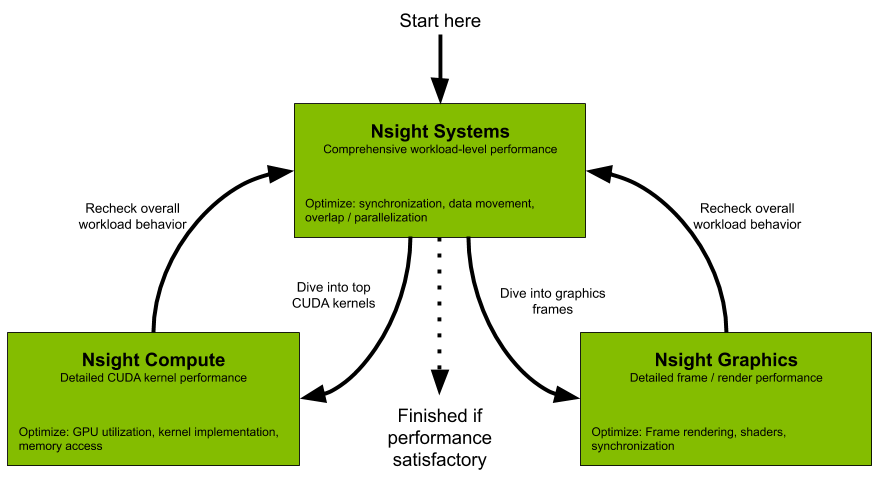
All developers should start with Nsight Systems to identify the largest optimization opportunities. Nsight Systems provides developers a system-wide visualization of an applications performance. Developers can optimize bottlenecks to scale efficiently across any number or size of CPUs and GPUs; from large servers to our smallest SoC. For further optimizations to compute kernels developers should use Nsight Compute or to further optimize a graphics workloads, use Nsight Graphics.
Nsight Compute
Nsight Compute is an interactive kernel profiler for CUDA applications. It provides detailed performance metrics and API debugging via a user interface and command line tool. Nsight Compute also provides customizable and data-driven user interface and metric collection that can be extended with analysis scripts for post-processing results.
Nsight Graphics
Nsight Graphics is a standalone application for the debugging, profiling, and analysis of graphics applications on Microsoft Windows and Linux. It allows you to optimize the performance of your Direct3D 11, Direct3D 12, DirectX Raytracing 1.1, OpenGL, Vulkan, and KHR Vulkan Ray Tracing Extension based applications.
Install Nsight local
check the perf config To collect thread scheduling data and IP (instruction pointer) samples
cat /proc/sys/kernel/perf_event_paranoid
如果大于2,临时改变 sudo sh -c 'echo 2 >/proc/sys/kernel/perf_event_paranoid'重启会重置
永久修改 sudo sh -c 'echo kernel.perf_event_paranoid=2 > /etc/sysctl.d/local.conf'
GPU Metrics [0]: The user running Nsight Systems does not have permission to access NVIDIA GPU Performance Counters on the target device. For more details, please visit https://developer.nvidia.com/ERR_NVGPUCTRPERM - API function: NVPW_GPU_PeriodicSampler_GetCounterAvailability(¶ms) - Error code: 17 - Source function: static std::vector<unsigned char> QuadDDaemon::EventSource::GpuMetricsBackend::Impl::CounterConfig::GetCounterAvailabilityImage(uint32_t) - Source location: /dvs/p4/build/sw/devtools/Agora/Rel/DTC_F/QuadD/Target/quadd_d/quadd_d/jni/EventSource/GpuMetricsBackend.cpp:609
Profile 速度
大致2到3倍时间:默认采样率,单独运行52s, Nsight-sys模拟需要135s。
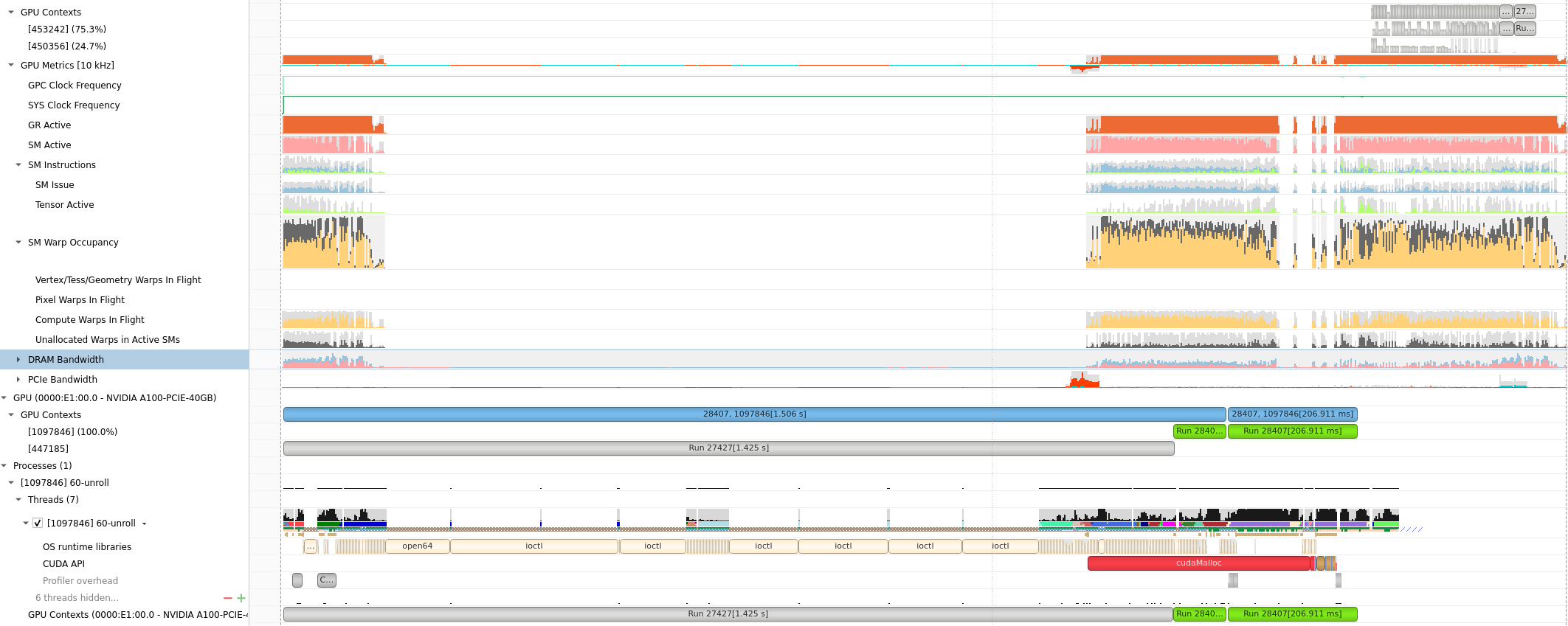
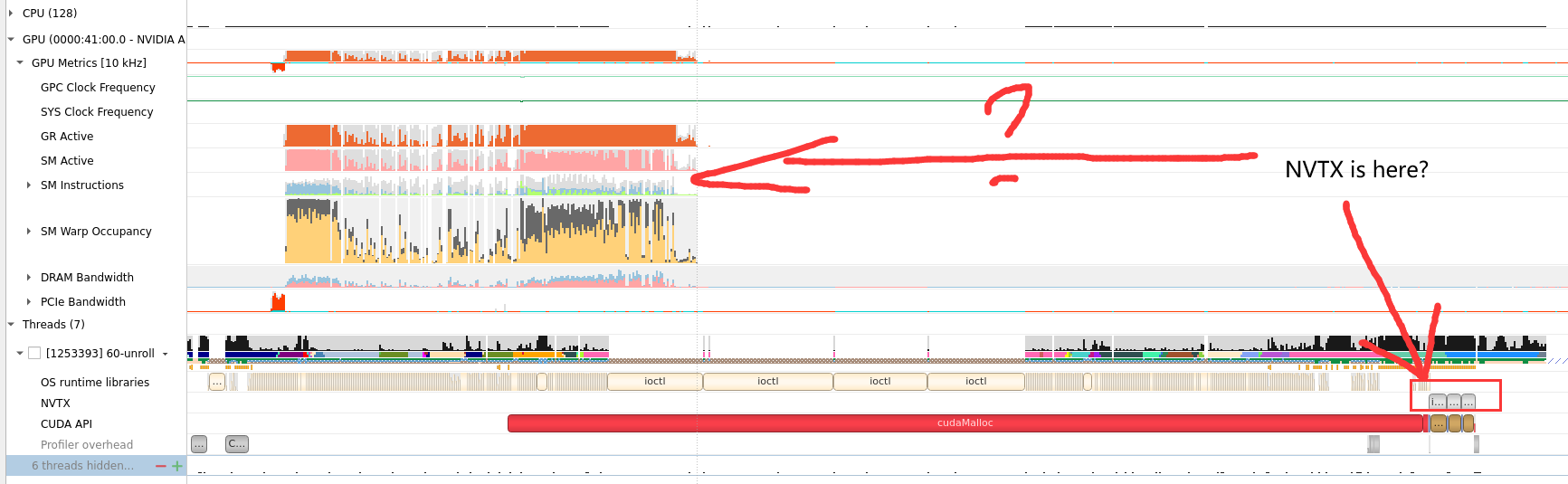
HPC APP : PCIE, GPU DRAM Bandwidth, Warp
GPU Metrics选项能看出 PCIE, GPU DRAM Bandwidth, Warp的使用情况。
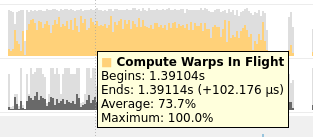
Compute Warps in Flight
将鼠标放在上面会有具体的数值或者名称的解释,(正在使用的Warps)
Unallocated Warps in Active SMs
Definition: This metric represents the number of warps that are not actively executing but are assigned to an active Streaming Multiprocessor (SM).
Interpretation: In CUDA, SMs are the fundamental processing units on the GPU. Each SM can execute multiple warps concurrently. “Unallocated Warps in Active SMs” indicates the number of warps that are ready to be scheduled on an SM but are currently waiting due to resource contention or other factors. A high number may suggest that there is room for additional work but available resources are not fully utilized.
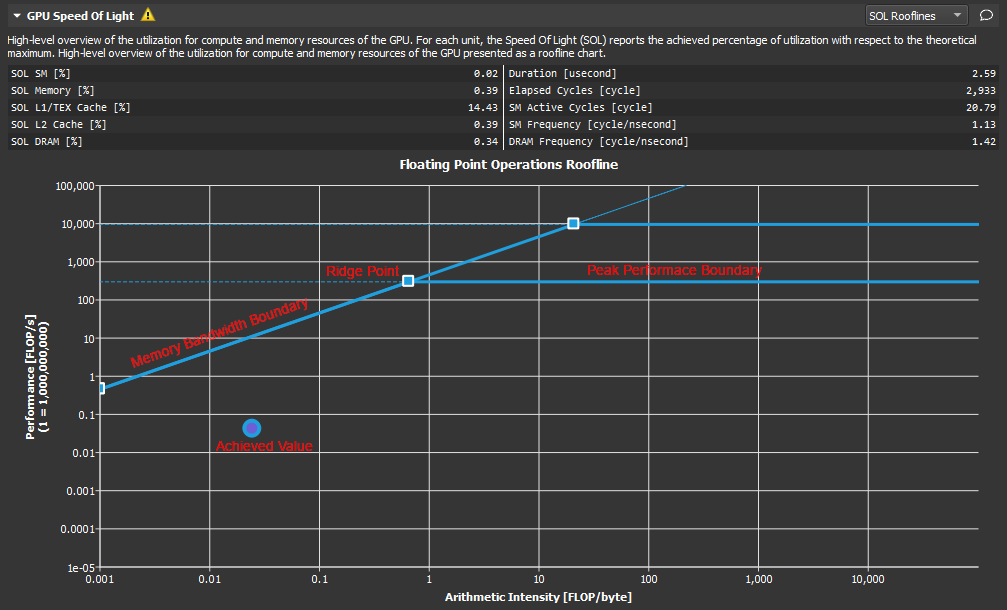
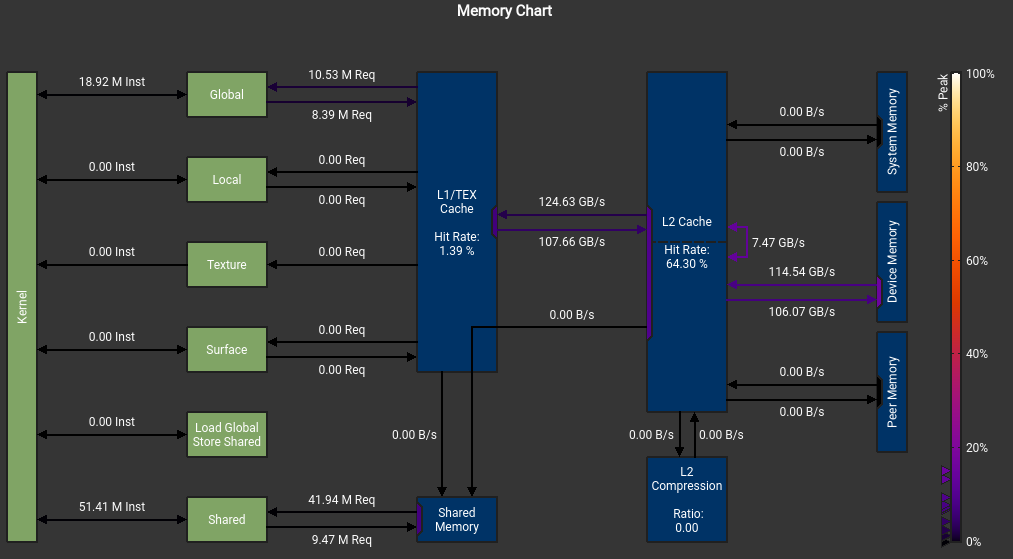
这个错误也是令人迷惑 The memory access pattern for loads from L1TEX to L2 is not optimal. The granularity of an L1TEX request to L2 is a 128 byte cache line. That is 4 consecutive 32-byte sectors per L2 request. However, this kernel only accesses an average of 3.7 sectors out of the possible 4 sectors per cache line. Check the Source Counters section for uncoalesced loads and try to minimize how many cache lines need to be accessed per memory request.
Warning: Failed to get OpenGL version. OpenGL version 2.0 or higher is required. OpenGL version is too low (0). Falling back to Mesa software rendering. qt.qpa.plugin: Could not load the Qt platform plugin "xcb"in"" even though it was found. This application failed to start because no Qt platform plugin could be initialized. Reinstalling the application may fix this problem.
Available platform plugins are: offscreen, wayland-egl, wayland, wayland-xcomposite-egl, wayland-xcomposite-glx, xcb.
qt.qpa.plugin: Could not load the Qt platform plugin "xcb" in "" even though it was found. This application failed to start because no Qt platform plugin could be initialized. Reinstalling the application may fix this problem.
Available platform plugins are: xcb.
Application could not be initialized! This is likely due to missing Qt platform dependencies. For a list of dependencies, please refer to https://doc.qt.io/qt-5/linux-requirements.html To view missing libraries, set QT_DEBUG_PLUGINS=1 and re-run the application.
按照说明 export QT_DEBUG_PLUGINS=1再次运行, 显示具体问题
1
Cannot load library /staff/shaojiemike/Install/cuda_11.7.0_515.43.04_linux/nsight-compute-2022.2.0/host/linux-desktop-glibc_2_11_3-x64/Plugins/platforms/libqxcb.so: (libxcb-xinput.so.0: cannot open shared object file: No such file or directory)
解决 sudo apt-get install libxcb-xinput0
kernel没权限profile
ERR_NVGPUCTRPERM - The user does not have permission to profile on the target device
要用sudo,或者最新的NV
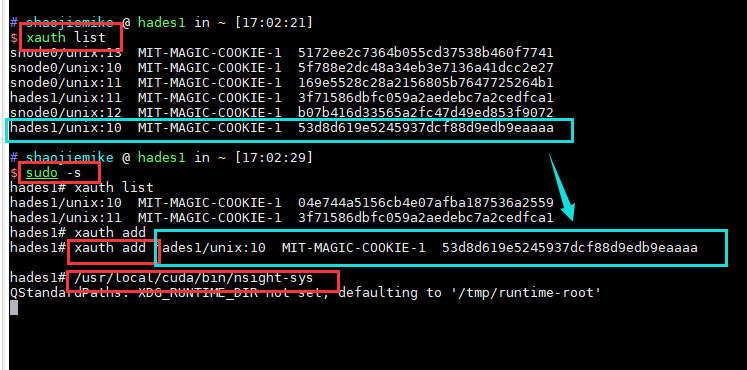
could not connect to display localhost:10.0 under sudo
1 2 3 4 5 6
$ sudo ncu-ui MobaXterm X11 proxy: Authorisation not recognised qt.qpa.xcb: could not connect to display localhost:10.0
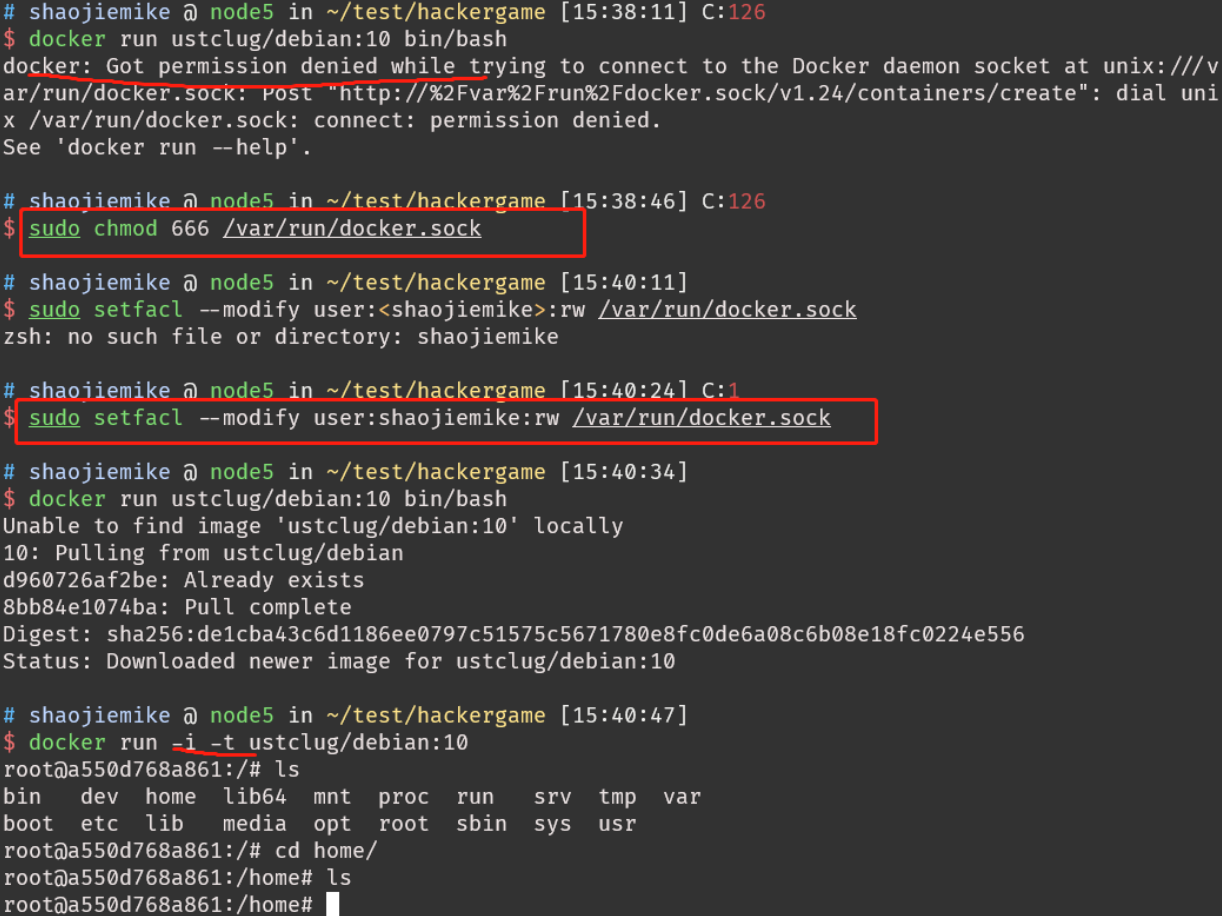
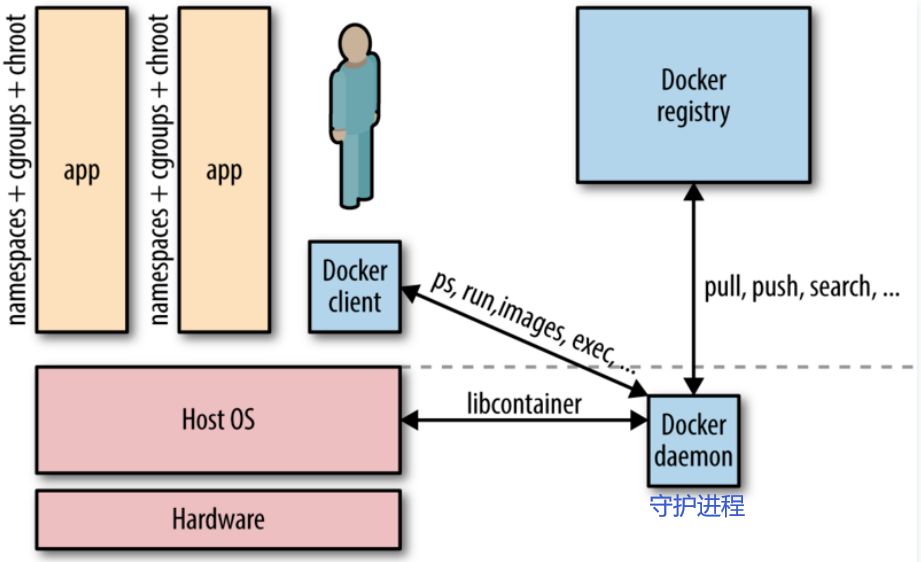
how docker run different ubuntu version Sharing the same running kernel? no SW conficts?
If your host kernel is “compatible enough“ with the software in the container you want to run it will work; otherwise, it won’t.[^1] So what does “compatible enough” mean? It depends on what requests the program makes of the kernel (system calls) and** what features it expects the kernel to support**. Some programs make requests that will break things; others don’t.
Compatibility
on an Ubuntu 18.04 (kernel 4.19) or similar host:[^1] docker run centos:7 bash works fine. docker run centos:6 bash fails with exit code 139, meaning it terminated with a segmentation violation signal; this is because the 4.19 kernel doesn’t support something that that build of bash tried to do. docker run centos:6 ls works fine because it’s not making a request the kernel can’t handle, as bash was. If you try docker run centos:6 bash on an older kernel, say 4.9 or earlier, you’ll find it will work fine.
Portainer 统一管理
安装Portainer Community Edition (CE)而不是Portainer Business Edition (BE)
Image like a static configed/compiled software using dockerfile/gcc.
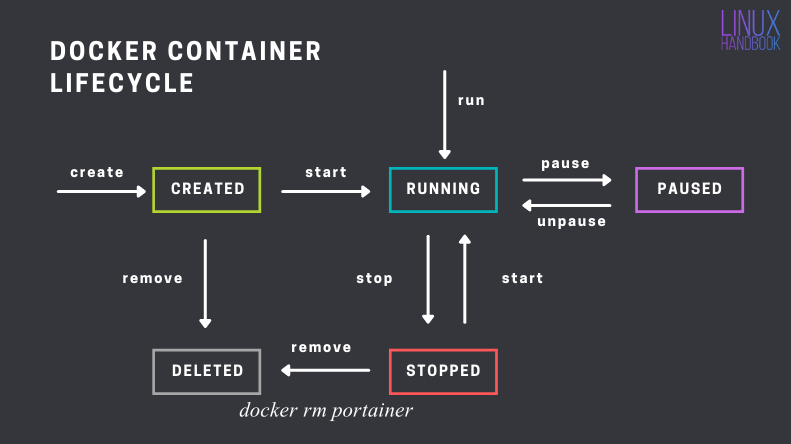
And container is a running process that we can control.
Dockerfile
First, write an installation script for all of your dependencies. This script is written with Docker specific syntax and is called a Dockerfile(1). { .annotate }
A Dockerfile is a script used to create a Docker image, which is a lightweight, standalone, and executable package that includes everything needed to run a piece of software, including the code, runtime, system tools, system libraries, and settings.
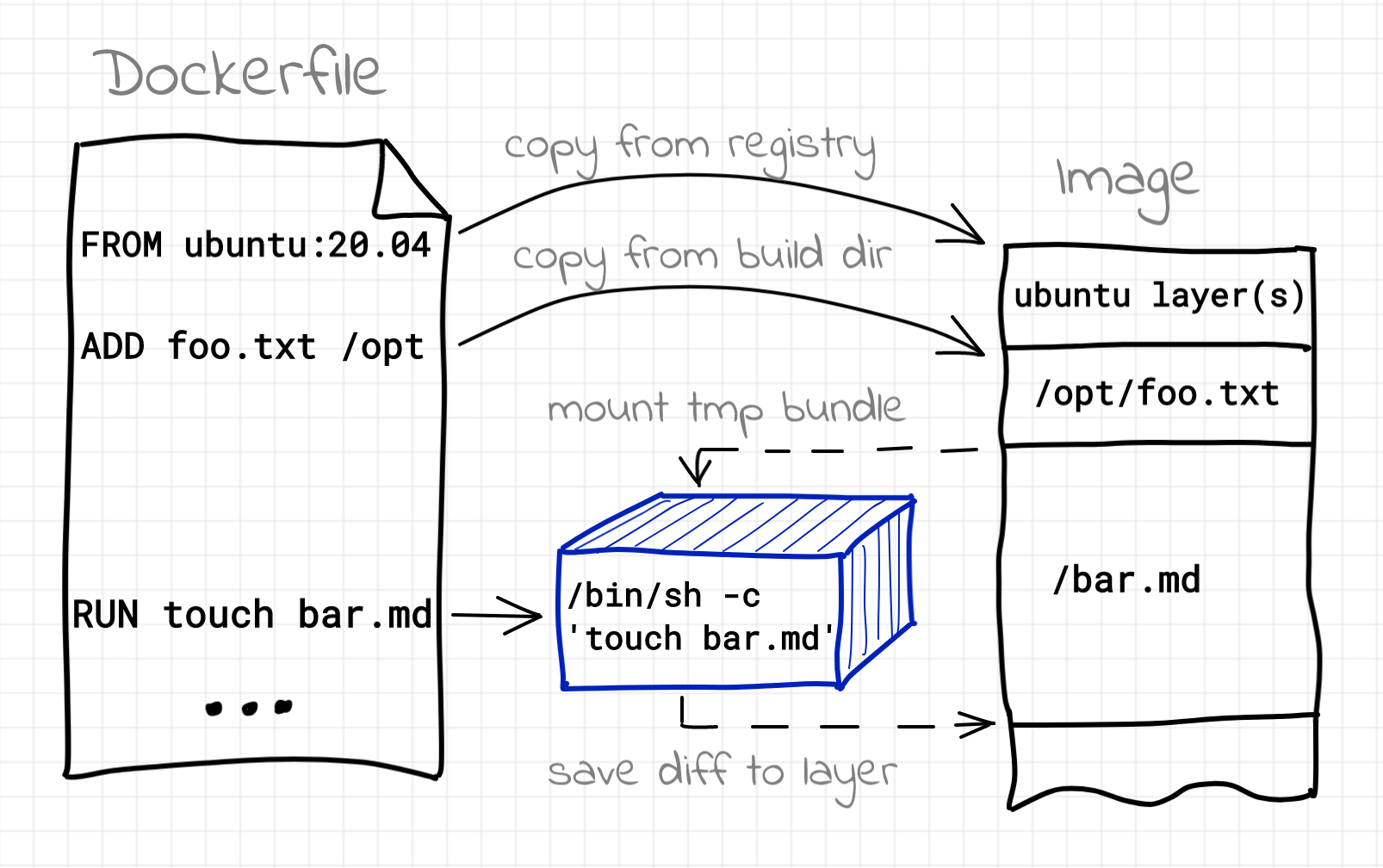
Building image using Dockerfile
Using dockerfile in portainer
Images > Build image
Dockerfile
Here’s a simple Dockerfile code snippet(it’s usually built on official base image):
# Set environment variables ENV MY_ENV_VARIABLE my_value
# Run commands to install packages and set up the environment RUN apt-get update && apt-get install -y \ package1 \ package2 \ && rm -rf /var/lib/apt/lists/*
# Copy files from your local machine to the container COPY local_directory /container_directory
# Set the working directory WORKDIR /app
# Expose a port EXPOSE8080
# Define the command to run when the container starts CMD ["command_to_start_application"]
Dec 30 16:32:59 localhost.localdomain systemd[1]: Started Docker Application Container Engine.
Dec 30 16:33:12 localhost.localdomain systemd[1]: /etc/systemd/system/docker.service.d/http-proxy.conf:2: Failed to resolve specifiers in HTTP_PROXY=http://p_atlas:proxy%40123@90.255.207.209:6688, ignoring: Invalid slot
Dec 30 16:33:12 localhost.localdomain systemd[1]: /etc/systemd/system/docker.service.d/http-proxy.conf:3: Failed to resolve specifiers in HTTPS_PROXY=http://p_atlas:proxy%40123@90.255.207.209:6688, ignoring: Invalid slot
J5GBR.png)

0F1X@WZW~J9U.png)





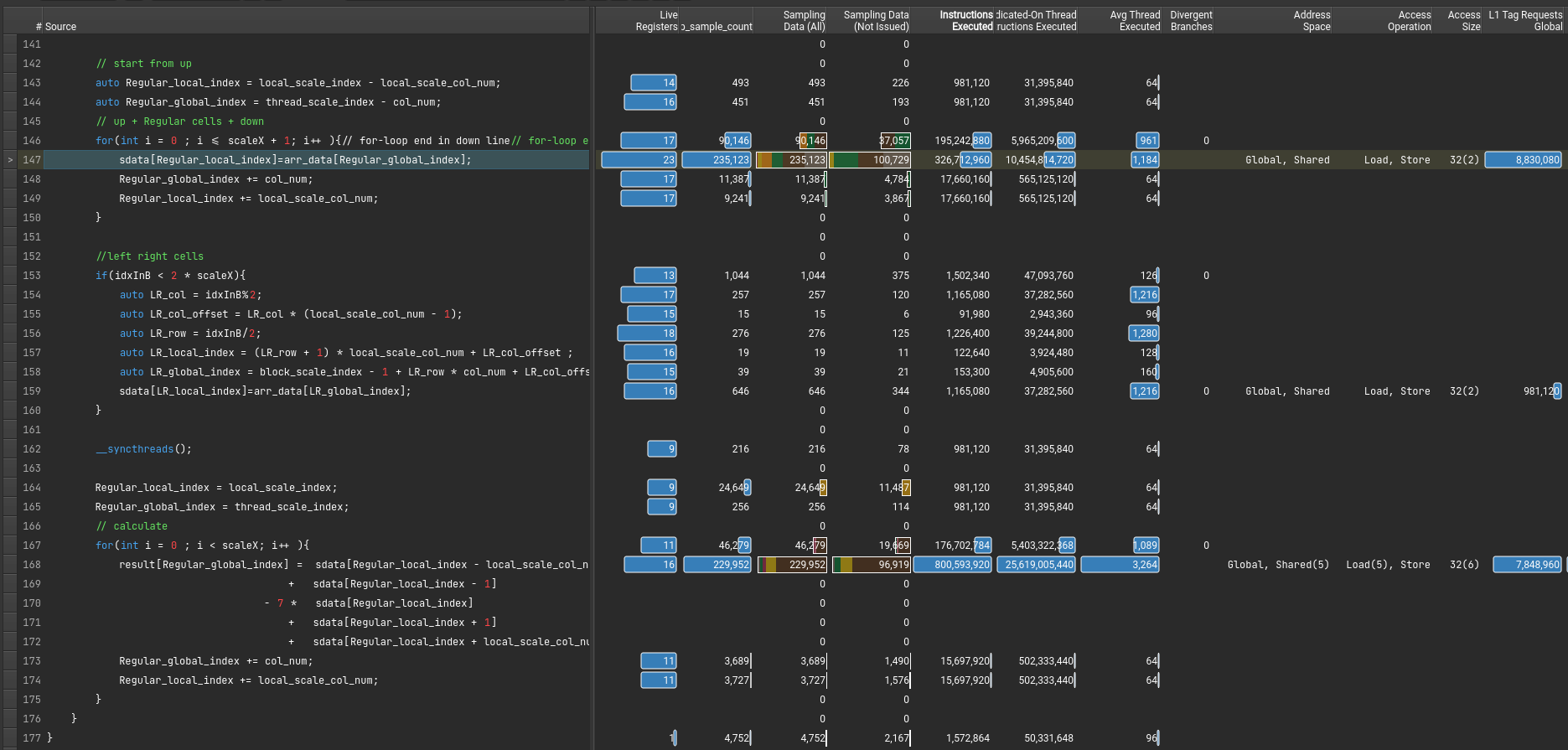
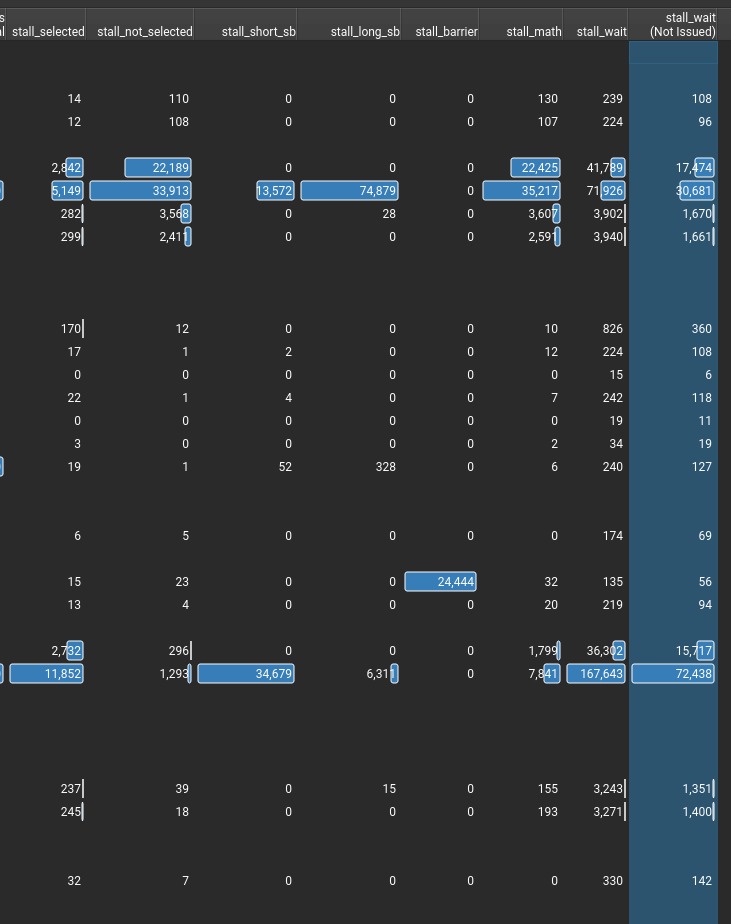
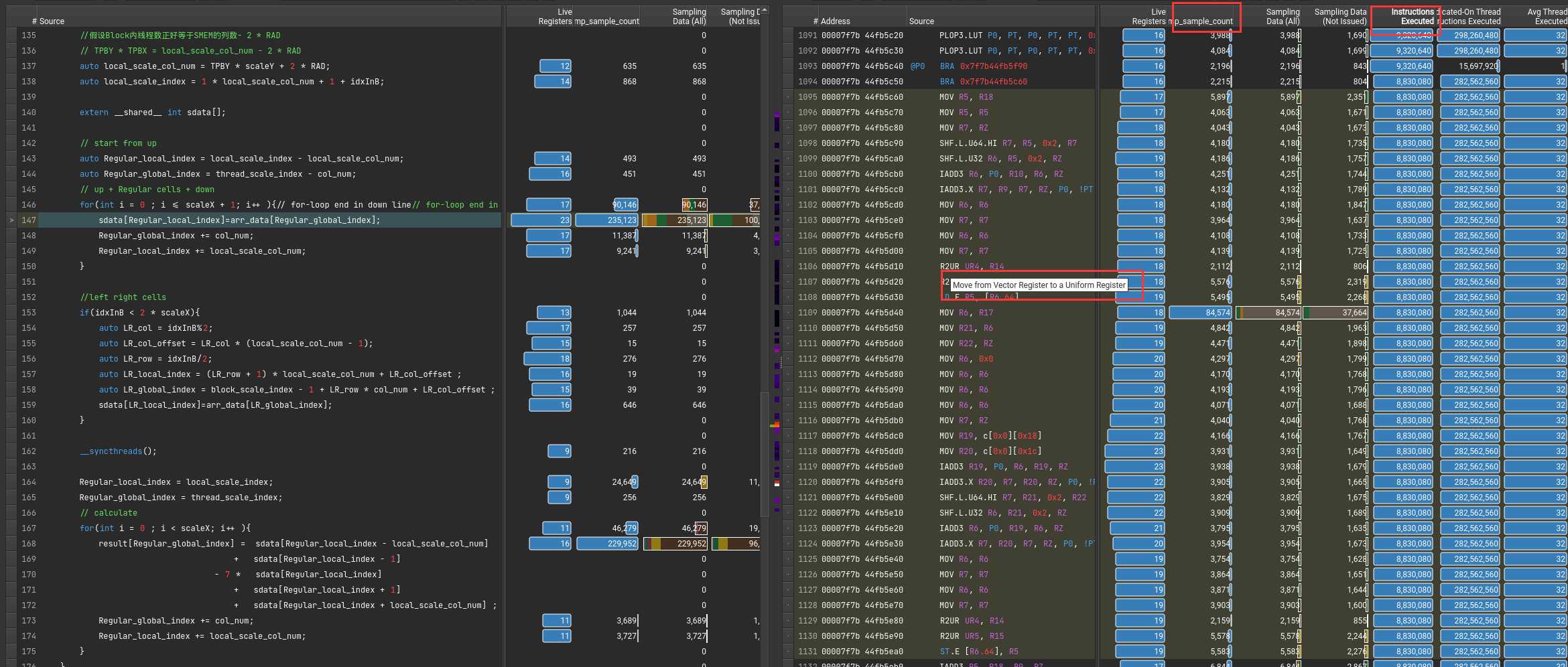
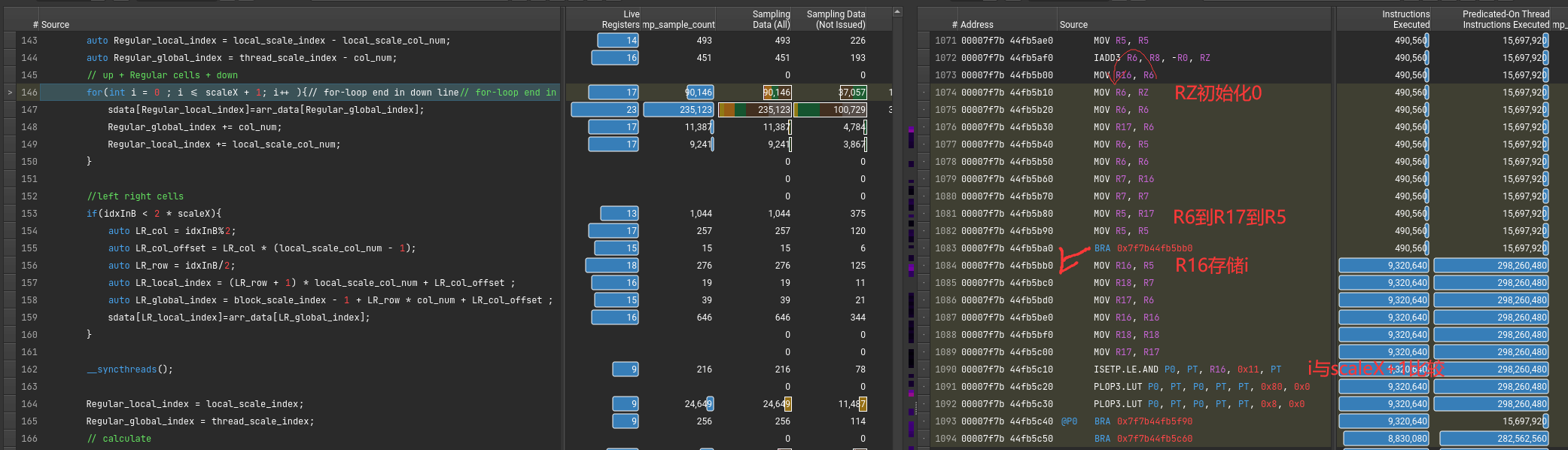


 { align=left }
 { align=right }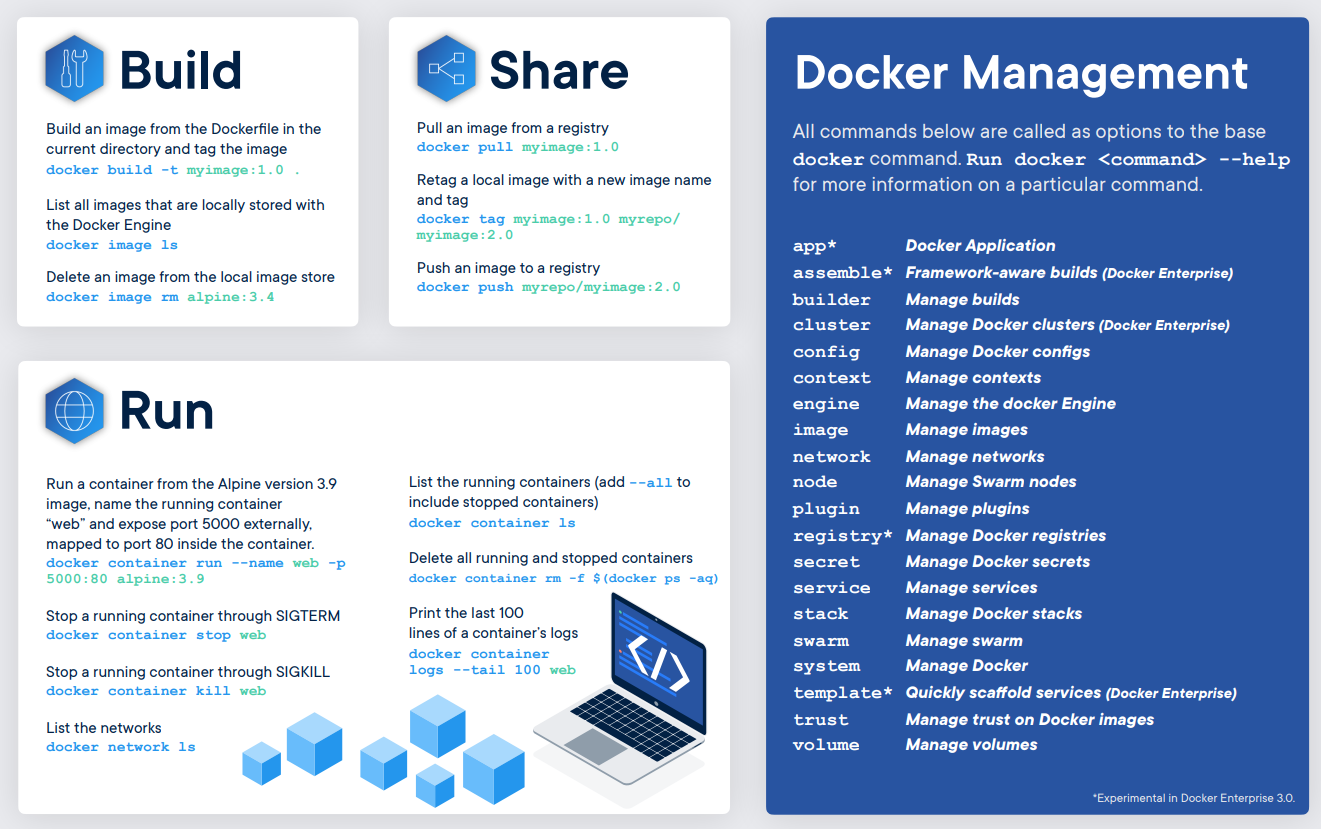
 [^2]
[^2]