Komga

简介

漫画或者PDF的jellyfin版本 , 类似的还有 基于docker的smanga

安利文简单使用文

选择

Rather than browse rouman online, high-resolution pivix pictures seems more worthy to be downloaded and maintained.

But first you need a much bigger NAS.

安装

  • 通过Docker安装(Docker on Windows 体验不好)
  • 通过java运行

Windows

  • 由于在portainer.io里路径有问题,选择直接在docker里点击image run创建容器。
  • 如果输入数据来源多,建议设置子目录data/1 and data/2。 and Please think carefully because restart container will triger the following bugs:
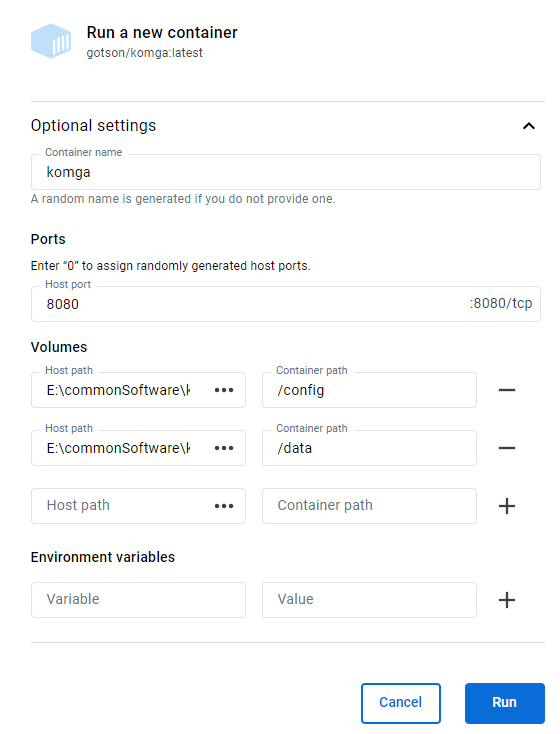
But docker on Windows remains many bugs:

  1. Failed to restart the docker engine
  2. deadlock between first free volume to delete container and first stop already stepped container to free related volume.

Linux docker

In http://brainiac.acsalab.com:2333/

step1: map remote data to local visual disk

  1. map windows disk to linux
  2. map Nas disk to linux sudo mount.cifs //synology.acsalab.com/Entertainment /synology -o user=xxx vers=3.0

Step2 : docker

采取第一种, 在 portainer.io的local的stack里使用docker compose部署

1
2
3
4
5
6
7
8
9
10
11
12
13
14
15
16
17
18
19
20
21
22
23
24
---
version: '3.3'
services:
komga:
image: gotson/komga
container_name: komga
volumes:
- type: bind
source: /mnt/e/commonSoftware/komga/config # Database and Komga configurations
target: /config
- type: bind
source: /mnt/e/commonSoftware/komga/data # Location of your data directory on disk. Choose a folder that contains both your books and your preferred import location for hardlinks to work.
target: /data/komga
- type: bind
source: /etc/timezone #alternatively you can use a TZ environment variable, like TZ=Europe/London
target: /etc/timezone
read_only: true
ports:
- 2333:8080 # 应用内部的 8080 到机器的2333端口。由于机器的8080被qBit占用了
user: "1000:1000"
# remove the whole environment section if you don't need it
environment:
- <ENV_VAR>=<extra configuration>
restart: unless-stopped

Docker in Ugreen Nas

  1. easy pull official komga image
  2. set mount disk
  3. set port

komga V.S. smanga V.S Kavita

  1. exhentai-manga-manager only on widnows
  2. smanga,
    1. 优点:
      1. 带标签和收藏,维持三级目录,
      2. 独特的目录设计。
    2. 缺点:
      1. png读取正常,但是zip解压过于缓慢
      2. PDF的支持暂时欠缺:
        1. 无法阅读
        2. PDF阅读与decompress的冲突
      3. 元数据不能自由编辑,只能编辑标签。
      4. 不能读取根目录的文件,但是能选择单行本,或许可以解决这个问题,但是需要尝试。
      5. 无法读到过深的文件夹。
    3. 小结:本来寄希望于这个all in one, 但是问题太多,还是只适合刮削好的资源。 可以不断完善和尝试。
    4. 举例:所有韩漫,
  3. Kavita
    1. 优点:
      1. 纯zip文件能读到深处的文件夹
      2. 日漫带标签和收藏,有缩略图。
      3. 元数据能自由编辑
    2. 缺点:
      1. 奇怪的文件名识别规则,导致
      2. 杂乱的类型(zip, png, pdf)会导致目录混乱
      3. 不能读取根目录的文件
    3. 小结:适合高度组织过后的内容
    4. 举例:2022单行本,零散日漫单行本。和calibre处理后的文件。
  4. komga
    1. 优点:
      1. 维持原始目录结构,稳定简洁。
      2. 元数据能自由编辑
      3. 根目录文件能识别
    2. 缺点:
      1. 没有收藏,保存和标签等功能,不适合碎片化连续看。
    3. 小结:适合混乱的内容,靠文件夹的并列和包含关系,维护逻辑关系。
    4. 举例:杂志(没有子文件夹包裹,识别不了),漫之学院(太大),日漫大合集(混乱的结构)

需要图书/漫画刮削

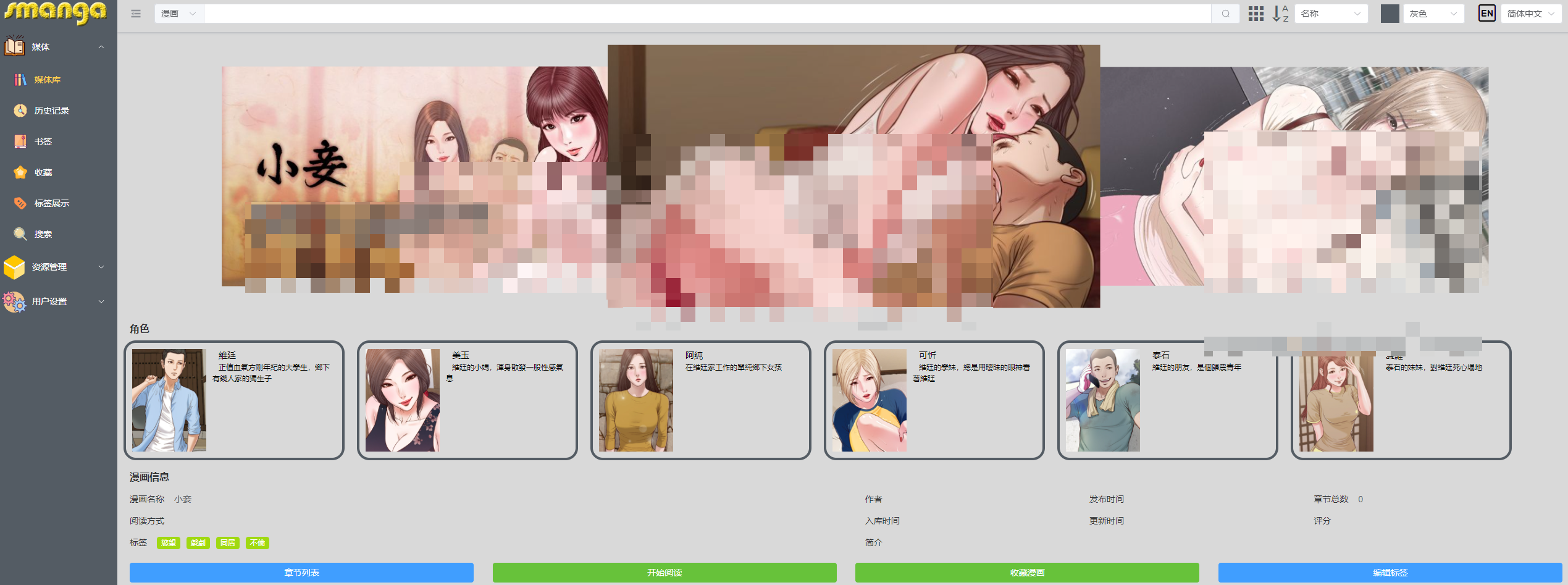
有刮削建议 smanga

有封面图和备注详细角色和类型信息。

dockers komga smanga Kavita
单一大PDF文件加载 缓慢 缓慢
格式支持 zip,cbz,pdf 部分zip不支持bug,不支持cbz zip,pdf ,cbz
如何支持单文件夹多图片 每个文件夹单独压缩成zip反而支持 :material-close:
自定义元数据 :material-close: :material-check: :material-check:
任意位置标签 :material-close: :material-check: :material-check:
已知bug 容器会自动关机(有待进一步测试)
总体评价 基础完善稳定,但是定制化不足 有用的定制化 全,但是不维持原目录有点恶心,导致必须按照类型整理。

Manga vs comic

“Manga” 和 “comic” 是两个术语,通常用于描述不同地区和文化中的漫画,其中 “manga” 常用于日本漫画,而 “comic” 通常用于西方漫画,包括美国漫画。

  1. Manga(漫画):
  • 地域: “Manga” 是日本的一种漫画形式,是日本漫画的通用术语。
  • 特点: Manga 的特点包括从右到左的阅读顺序,经常包含有关日本文化和社会的元素,以及广泛的主题和风格。
  1. Comic(漫画):
  • 地域: “Comic” 是一个通用的英语词汇,用于描述西方国家的漫画,主要是美国漫画。
  • 特点: Comic 的特点包括从左到右的阅读顺序,以及通常较大的页数和较大的漫画行业。

需要注意的是,”manga” 和 “comic” 不仅仅是描述漫画的词汇,它们还代表了不同的创作风格、文化和产业。虽然在某些上下文中可能会使用这两个词汇来泛指漫画,但在讨论时最好根据具体的地域和文化使用适当的术语。

其余未汉化版本

LANraragi

推荐文件结构

kativa

1
2
3
4
Library Root
┖── Series Name
┖── Series Name SP01 Special Name.cbz
┖── abc.cbz
  • Kavita enforces that all files are within folders from the library root. Files at library root will be ignored.
  • kativa 会将不符合文件夹命名Series Name的新文件(e.g.,abc.cbz),当作新的作品单独列出在根目录。这十分傻逼,对内容的共振度的要求也太高了。出现一个命名不规范的文件就会乱套。
  • kativa 对文件类型也会做特殊处理,对png, cbz, zip文件会有不同的阅读器,最搞笑的是 kativa会把子章节cbz的同名图片单独用个文件夹放置,而不是识别出章节的封面图,kativa会读取子章节cbz的内容当作封面图。

smanga

可以看得出作者有特殊的设计。
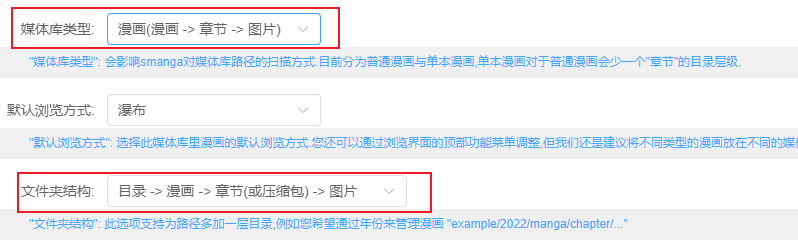
但是美中不足的是对于子文件夹的支持不够,太深的文件读取不到。

单行本
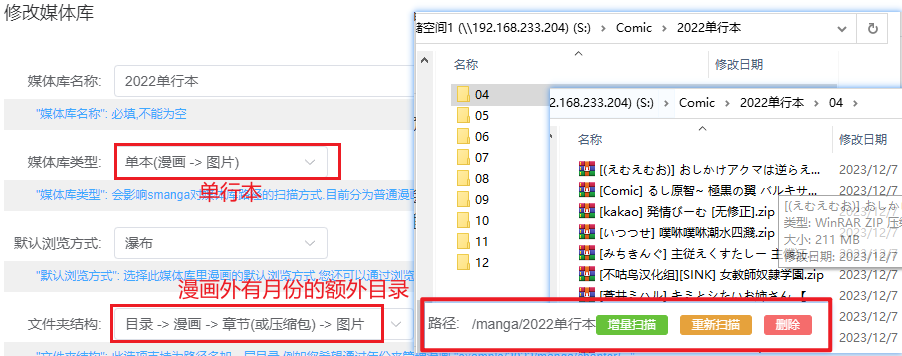
理论如此,但是实际貌似会卡住。

komga

Komga支持CBZ/CBR、EPUB、PDF格式。对于漫画而言,个人觉得cbz1是最简单、兼容性最高的格式。

建议的文件结构如下:

1
2
3
4
5
6
7
8
9
.
└── libraryManga
├── 我 推 的 孩 子
│ ├── 第 1话.cbz
│ └── 第 9话 .cbz
└── 辉夜大小姐想让我告白
├── 01话 .cbz
└── 02话.cbz
3 directories, 4 files
  • libraryManga表示库名,下一层结构区分不同的漫画,更下一层则存储漫画文件
  • komga相对于kavita的异同
    • 都不会识别根目录下的文件
    • 但是komga不会管Series文件夹的子文件夹,会认为不存在,全部打散。kavata由于命名的原因会将Series文件夹的子文件夹内的内容当作新的系列,提到根目录显示。

内容的组织

需要考虑的点

内容的组织考虑的是一个平衡,每个lib下应该只有40个左右的内容。

  • 根据类别分类:
    • 韩漫,日漫,杂志
  • 根据时间分类:每个月大约有50部左右

下载的内容的特点:

  • 日漫,很多是单行本没有系列的,所以系列的这一级文件夹可以使用时间代替
  • 有些库太大了,估计有一千本漫画(漫之学院),必须分开。
  • 有些库还是识别不了 合集/A/PDF/*

实践

看多少,刮削多少。

内容的刮削

calibre + ehentai

见 Calibre and its Pugins for e-hentai Books 一文

好奇?这些日本的单行本有元数据吗?来自哪里的?

漫画大部分来自E-hentai/Exhentai [^1]

还有 nheitai hanime1的漫画站就是这个的克隆。

里番-> 桜都字幕组 -> Nyaa里站,同时南+

失败:BangumiKomga

  • 一个从Bangumi获取元数据并填充的Python脚本
  • 但是自动识别刮削的成功率很低,强烈建议在Bangumi中先找到对应漫画后把链接贴到Komga系列作品链接处,标签写为cbl,配置好后在目录下运行python processMetadata.py,即可近乎完美的给漫画加上海报和信息了
  • 但是Bangumi又没有本子的内容

集成订阅平台:tachidesk

尝试后发现是,类似RSS的漫画网页集成浏览器(B站,腾讯漫画,18+漫画)。实现订阅,跟踪,一键下载。 由于生态很不错,不用担心订阅链接失效。

Bugs docker stopped in UGREEEN

我猜测是内存不够

kavita自动关机

1
2
3
4
5
6
7
8
9
10
11
12
13
14
15
16
17
18
19
20
21
22
23
24
[Kavita] [2023-12-08 07:21:00.508 +00:00  194] [Information] Serilog.AspNetCore.RequestLoggingMiddleware HTTP GET /api/image/series-cover?seriesId=759&apiKey=39714029-85f9-446c-9834-9ad384fda00d responded 304 in 0.9718 ms
[Kavita] [2023-12-08 07:21:50.010 +00:00 188] [Information] Serilog.AspNetCore.RequestLoggingMiddleware HTTP POST /api/account/refresh-token responded 200 in 2630.1327 ms
[Kavita] [2023-12-08 07:21:50.043 +00:00 193] [Information] Serilog.AspNetCore.RequestLoggingMiddleware HTTP GET /api/license/valid-license?forceCheck=false responded 200 in 17.1837 ms
[Kavita] [2023-12-08 07:21:50.045 +00:00 182] [Information] Serilog.AspNetCore.RequestLoggingMiddleware HTTP POST /hubs/messages/negotiate?negotiateVersion=1 responded 200 in 5.7189 ms
[Kavita] [2023-12-08 07:21:50.131 +00:00 168] [Information] Serilog.AspNetCore.RequestLoggingMiddleware HTTP GET /api/device responded 200 in 107.7960 ms
Server is shutting down. Please allow a few seconds to stop any background jobs...
You may now close the application window.
[Kavita] [2023-12-08 07:21:55.785 +00:00 179] [Information] Serilog.AspNetCore.RequestLoggingMiddleware HTTP POST /hubs/messages/negotiate?negotiateVersion=1 responded 200 in 0.1795 ms
[Kavita] [2023-12-08 07:21:55.789 +00:00 45] [Information] Microsoft.Hosting.Lifetime Application is shutting down...
[Kavita] [2023-12-08 07:22:26.562 +00:00 179] [Fatal] Host terminated unexpectedly
System.AggregateException: One or more hosted services failed to stop. (The operation was canceled.)
---> System.OperationCanceledException: The operation was canceled.
at System.Threading.CancellationToken.ThrowOperationCanceledException()
at System.Threading.CancellationToken.ThrowIfCancellationRequested()
at Hangfire.Processing.TaskExtensions.WaitOneAsync(WaitHandle waitHandle, TimeSpan timeout, CancellationToken token)
at Hangfire.Processing.BackgroundDispatcher.WaitAsync(TimeSpan timeout, CancellationToken cancellationToken)
at Hangfire.Server.BackgroundProcessingServer.WaitForShutdownAsync(CancellationToken cancellationToken)
at Microsoft.Extensions.Hosting.Internal.Host.StopAsync(CancellationToken cancellationToken)
--- End of inner exception stack trace ---
at Microsoft.Extensions.Hosting.Internal.Host.StopAsync(CancellationToken cancellationToken)
at Microsoft.Extensions.Hosting.HostingAbstractionsHostExtensions.WaitForShutdownAsync(IHost host, CancellationToken token)
at Microsoft.Extensions.Hosting.HostingAbstractionsHostExtensions.RunAsync(IHost host, CancellationToken token)
at API.Program.Main(String[] args) in /home/runner/work/Kavita/Kavita/API/Program.cs:line 115

komga自动关机

查看对应docker日志, 猜测容器运行时,可能会受到资源限制,例如内存不足、CPU 使用过高等。如果容器超过了资源限制,可能会被系统强制关闭。

1
2
3
4
5
6
7
8
9
10
11
12
13
14
15
16
17
18
2023-12-07T11:28:39.022Z  INFO 1 --- [taskProcessor-4] o.g.komga.application.tasks.TaskHandler  : Task FindBooksWithMissingPageHash(libraryId='0EEB1WDMHPFT0', priority='0') executed in 722.922us
2023-12-07T11:28:39.080Z INFO 1 --- [taskProcessor-4] o.g.komga.application.tasks.TaskHandler : Executing task: FindDuplicatePagesToDelete(libraryId='0EEB1WDMHPFT0', priority='0')
2023-12-07T11:28:39.096Z INFO 1 --- [taskProcessor-4] o.g.komga.application.tasks.TaskEmitter : Sending tasks: []
2023-12-07T11:28:39.096Z INFO 1 --- [taskProcessor-4] o.g.komga.application.tasks.TaskHandler : Task FindDuplicatePagesToDelete(libraryId='0EEB1WDMHPFT0', priority='0') executed in 16.090346ms
2023-12-07T13:38:16.408Z INFO 1 --- [ionShutdownHook] o.s.b.w.e.tomcat.GracefulShutdown : Commencing graceful shutdown. Waiting for active requests to complete
2023-12-07T13:38:16.638Z INFO 1 --- [tomcat-shutdown] o.s.b.w.e.tomcat.GracefulShutdown : Graceful shutdown complete
2023-12-07T13:38:18.871Z INFO 1 --- [ionShutdownHook] com.zaxxer.hikari.HikariDataSource : SqliteTaskPool - Shutdown initiated...
2023-12-07T13:38:18.883Z INFO 1 --- [ionShutdownHook] com.zaxxer.hikari.HikariDataSource : SqliteTaskPool - Shutdown completed.
2023-12-07T13:38:18.887Z INFO 1 --- [ionShutdownHook] com.zaxxer.hikari.HikariDataSource : SqliteUdfPool - Shutdown initiated...
2023-12-07T13:38:18.889Z INFO 1 --- [ionShutdownHook] com.zaxxer.hikari.HikariDataSource : SqliteUdfPool - Shutdown completed.
____ __.
| |/ _|____ _____ _________
| < / _ \ / \ / ___\__ \
| | ( <_> ) Y Y \/ /_/ > __ \_
|____|__ \____/|__|_| /\___ (____ /
\/ \//_____/ \/

Version: 1.8.4

需要进一步的研究学习

暂无

遇到的问题

暂无

开题缘由、总结、反思、吐槽~~

参考文献

https://sspai.com/post/79100

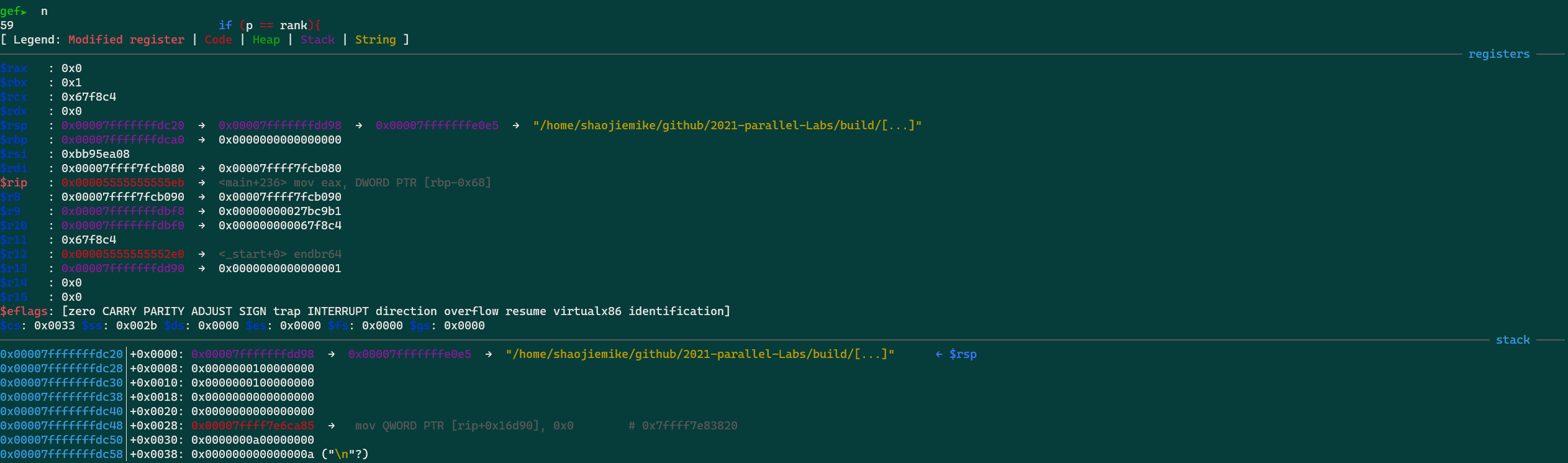
GDB

GDB 基本命令

命令 描述
next 单步执行
step 单步进入
finish or fin 跳出当前函数
continue 继续执行到下一个断点
until 继续运行到指定位置
  • 跳出当前函数 finish: Continue running until just after function in the selected stack frame returns. Print the returned value (if any).

运行带参数程序

  • gdb --args 正常程序+参数
  • 进入gdb后运行 set args 参数

break断点

  • f 打印当前文件 ,便于打断点
  • info breakpoints 查看已经的断点
  • del 3 删除NUM=3的第三个断点

给某个结构体内的函数全部上break

1
rbreak file.cpp:.*TemplateClass.*

打印信息

  • 参数 show args
  • 局部变量 info locals
  • 修改变量 p result=20
  • 函数调用栈 bt

多线程

  • info threads
  • 切换线程 thread 2
  • 打印线程堆栈 thread apply all bt

代码信息

1
2
3
4
5
list # 代码,需要-g
info line
info source
where
disas # 汇编

结构体class

1
2
3
4
gef➤  p -raw-values off -- this->TotalCycles
gef➤ p this
$11 = (llvm::mca::SummaryView * const) 0x7fffffffcc08
gef➤ p *this

指针变量

  • 二维指针 p **matrix@3@3
  • 一维指针 p *matrix@3
  • 或者转换为数组 p *(int *)matrix@3
  • 或者转换为数组 p *(int (*)[3])matrix

数组

1
2
(gdb) p array[60]@10
$9 = {60, 61, 62, 63, 64, 65, 66, 67, 68, 69}

可以看到打印了array数组第60~69个元素的值。如果要打印从数组开头连续元素的值,也可使用这个命令:“p *array@num”:

1
2
(gdb) p *array@10
$2 = {0, 1, 2, 3, 4, 5, 6, 7, 8, 9}

内存地址内容

examine 命令(简写是 x)

格式x /nfu <addr>

说明

  • x 是 examine 的缩写。
  • n 表示要显示的内存单元的个数。
  • f 表示显示方式,可取如下值:
显示方式 描述
x 按十六进制格式显示变量。
d 按十进制格式显示变量。
u 按无符号整型格式显示变量。
o 按八进制格式显示变量。
t 按二进制格式显示变量。
a 按十六进制格式显示变量。
i 指令地址格式。
c 按字符格式显示变量。
f 按浮点数格式显示变量。
  • u 表示一个地址单元的长度,长度类型如下:
类型 描述
b 单字节
h 双字节
w 四字节
g 八字节

example:

1
2
3
4
5
6
(gdb) x 0x8049948
0x8049948: 0x20726f46
(gdb) x/s 0x8049948
0x8049948: "For NASA,space is still a high priority."
(gdb) x/4 0x7fffe536dbc0 # display 4 bytes info?
0x7fffe536dbc0: 0x0 0x0 0x9d835 0x0

打印寄存器值(表格)

1
2
3
layout split
layout regs
tui reg general

GDB segmentation fault

段错误定位

1
2
3
4
5
6
7
8
9
10
# ulimit -c 显示核心转储文件大小的最大值
ulimit -c unlimited # 打开
ulimit -c 0 # 关闭

# 改变core存储位置
#%e 打印线程name
#%p 打印进程id
#%h 打印主机名
#%t 打印时间
echo '/tmp/core-%e.%p.%h.%t' > /proc/sys/kernel/core_pattern

c++程序

  1. 执行编译加入-g的SLIC程序,产生core文件
  2. 然后执行进gdb
    1
    2
    gdb SLIC core.199048
    bt
    1
    2
    3
    4
    (gdb) bt
    #0 0x00002af6047e4a4b in fgets () from /lib64/libc.so.6
    #1 0x000000000040450a in LoadPPM (filename=0x407e63 "input_image.ppm", data=0x7ffecda55cc8, width=0x7ffecda55cc4, height=0x7ffecda55cc0) at SLIC_raw.cpp:692
    #2 0x00000000004049e1 in main (argc=1, argv=0x7ffecda55de8) at SLIC_raw.cpp:794

python 程序

1
2
3
4
5
6
7
# add debug file for gdb
cd /compile_path/build
cp dbg/libtorch_npu.so.debug /path2conda/site-packages/torch_npu/lib
# gdb need the same python env
conda activate xxx
gdb python core_xxx
# bt

问题

define内容难以解析

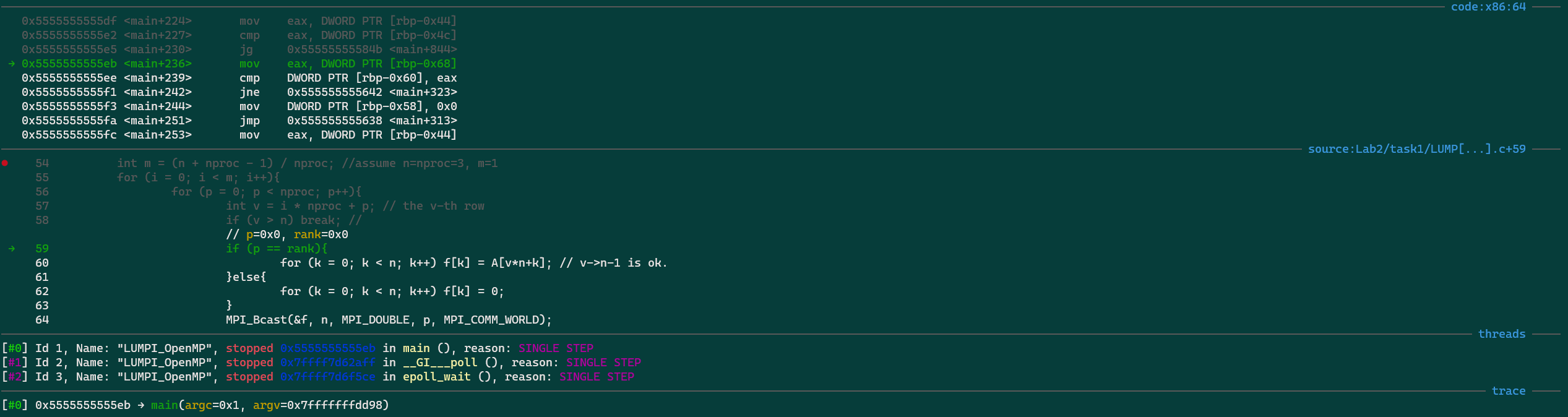
gef 界面

效果

会打印详细的信息


安装gef

需要GDB10以上

1
2
3
4
5
bash -c "$(curl -fsSL http://gef.blah.cat/sh)"

# 没有网,手动下 https://gef.blah.cat/py ,替换
$ wget -O ~/.gdbinit-gef.py -q https://gef.blah.cat/py
$ echo source ~/.gdbinit-gef.py >> ~/.gdbinit

注意:gdbtui 与 gef 不太兼容

开题缘由、总结、反思、吐槽~~

参考文献

Script: Email notifications when machine is free

outline

login to free SMTP server(qq, google) to send email to others.

send email using command line

  1. check ping mail.ustc.edu.cn
  2. MUST : set gmail open to support SMTP and apppassword
    1. or config qq email

IMAP, POP3 or SMTP

mailutils

According to ref1.

1
2
3
# install ca-certificates
# After new a google accounts,
# config according to ref1
1
2
sudo apt-get install mailutils
$ echo "Hello world" | mail -s "Test" shaojiemike@mail.ustc.edu.cn

send but the same, more crazy thing is the -v and -d flag is not supported. and --debug-level=trace0 isn’t recognized. many same question in StackOverflow

sudo tail -n 30 /var/log/mail.log or mail.error show more info.

ssmtp

We try ref2 ssmtp, sudo vim /etc/ssmtp/ssmtp.conf

1
2
3
4
5
6
7
8
9
10
TLS_CA_FILE=/etc/pki/tls/certs/ca-bundle.crt
root=shaojieemail@gmail.com
mailhub=smtp.gmail.com:587
rewriteDomain=gmail.com
AuthUser=shaojieemail
AuthPass={apppassword}
FromLineOverride=YES
UseSTARTTLS=Yes
UseTLS=YES
hostname=snode6

The config get work but not well configed, e.g., TLS_CA_FILE

sending a email using gmail took about 13 mins.

1
2
3
4
5
6
7
8
9
10
11
$ ssmtp 943648187@qq.com < mail.txt
......
[->] Received: by snode6 (sSMTP sendmail emulation); Wed, 06 Sep 2023 15:42:05 +0800
[->] From: "Shaojie Tan" <shaojiemike@gmail.com>
[->] Date: Wed, 06 Sep 2023 15:42:05 +0800
[->] test server email sending
[->]
[->] .
[<-] 250 2.0.0 OK 1693986323 5-20020a17090a1a4500b0026b4ca7f62csm11149314pjl.39 - gsmtp
[->] QUIT
[<-] 221 2.0.0 closing connection 5-20020a17090a1a4500b0026b4ca7f62csm11149314pjl.39 - gsmtp

sendmail

1
2
$ sendmail 94364818s7@qq.com < mail.txt
sendmail: Authorization failed (535 5.7.8 https://support.google.com/mail/?p=BadCredentials e7-20020a170902b78700b001c0c79b386esm8725297pls.95 - gsmtp)

get to work after well config gmail setting.

Speed Compare

command snode6 time(mins) icarus1
mail 4 1s
ssmtp 13
sendmail 6

send email by python

ref using QQ apppassword and python.

email notifications

  1. Create a Bash Script: Create a Bash script that checks the CPU usage and sends an email if it’s below 30%. For example, create a file named cpu_check.sh:

    1
    2
    3
    4
    5
    6
    7
    8
    9
    10
    11
    #!/bin/bash

    # Get CPU usage percentage
    cpu_usage=$(top -b -n 1 | grep '%Cpu(s):' | awk '{print $2}' | cut -d'.' -f1)
    echo "cpu_usage : ${cpu_usage} on $(hostname)"
    # Check if CPU usage is below 30%
    if [ "$cpu_usage" -lt 30 ]; then
    echo "beyond threshold : ${cpu_usage} on "
    # Send an email
    echo "CPU usage is ${cpu_usage} below 30% on $(hostname)" | mail -s "Low CPU Usage Alert on $(hostname)" your_email@example.com
    fi

    Make the script executable:

    1
    chmod +x cpu_check.sh

    Modify your_email@example.com with your actual email address.

  2. Schedule the Script: Use the cron scheduler to run the script at regular intervals. Edit your crontab by running:

    1
    crontab -e

    Add an entry to run the script, for example, every 5 minutes:

    1
    2
    3
    */5 * * * * /staff/shaojiemike/test/cpu_check.sh >> /staff/shaojiemike/test/cpu_check.log
    # Run every 15 minutes during working hours (9 am to 7 pm)
    */15 9-19 * * * /path/to/your/script.sh

    Replace /path/to/cpu_check.sh with the actual path to your Bash script.

  3. Save and Exit: Save the crontab file and exit the text editor.

Now, the script will run every 5 minutes (adjust the cron schedule as needed) and send an email notification if the CPU usage is below 50%. You should receive an email when the condition is met.

Please note that this is a basic example, and you can modify the script to include more details or customize the notification further as needed. Additionally, ensure that your server is configured to send emails; you may need to configure SMTP settings for the mail or sendmail command to work correctly.

需要进一步的研究学习

暂无

遇到的问题

暂无

开题缘由、总结、反思、吐槽~~

参考文献

上面回答部分来自ChatGPT-3.5,没有进行正确性的交叉校验。

Zsim-tlb: bug

bug

zsim-tlb simulate in icarus0

1
2
pinbin: build/opt/zsim.cpp:816: LEVEL_BASE::VOID VdsoCallPoint(LEVEL_VM::THREADID): Assertion `vdsoPatchData[tid].level' failed.
Pin app terminated abnormally due to signal 6.

locate error

1
2
3
4
5
6
VOID VdsoCallPoint(THREADID tid) {
//level=0,invalid
assert(vdsoPatchData[tid].level);
vdsoPatchData[tid].level++;
// info("vDSO internal callpoint, now level %d", vdsoPatchData[tid].level); //common
}
  • vDSO (virtual dynamic shared object) is a kernel machanism for exporting a carefully set kernel space routines (eg. not secret api, gettid() and gettimeofday()) to user
    spapce to eliminate the performance penalty of user-kernel mode switch according to wiki. vDSO
  • You can use some __vdso_getcpu() C library, and kernel will auto move it to user-space
  • vDSO overcome vsyscall(first linux-kernel machanism to accelerate syscall) drawback.
  • In zsim, vDSO have only four function enum VdsoFunc {VF_CLOCK_GETTIME, VF_GETTIMEOFDAY, VF_TIME, VF_GETCPU};

vDSO simulate part

1
2
3
4
5
6
7
8
9
10
11
12
13
14
15
16
17
18
19
20
21
22
23
// Instrumentation function, called for EVERY instruction
VOID VdsoInstrument(INS ins) {
ADDRINT insAddr = INS_Address(ins); //get ins addr
if (unlikely(insAddr >= vdsoStart && insAddr < vdsoEnd)) {
//INS is vdso syscall
if (vdsoEntryMap.find(insAddr) != vdsoEntryMap.end()) {
VdsoFunc func = vdsoEntryMap[insAddr];
//call VdsoEntryPoint function
//argv are: tid ,func(IARG_UINT32),arg0(LEVEL_BASE::REG_RDI),arg1(LEVEL_BASE::REG_RSI)
INS_InsertCall(ins, IPOINT_BEFORE, (AFUNPTR) VdsoEntryPoint, IARG_THREAD_ID, IARG_UINT32, (uint32_t)func, IARG_REG_VALUE, LEVEL_BASE::REG_RDI, IARG_REG_VALUE, LEVEL_BASE::REG_RSI, IARG_END);
} else if (INS_IsCall(ins)) { //call instruction
INS_InsertCall(ins, IPOINT_BEFORE, (AFUNPTR) VdsoCallPoint, IARG_THREAD_ID, IARG_END);
} else if (INS_IsRet(ins)) { //Ret instruction
INS_InsertCall(ins, IPOINT_BEFORE, (AFUNPTR) VdsoRetPoint, IARG_THREAD_ID, IARG_REG_REFERENCE, LEVEL_BASE::REG_RAX /* return val */, IARG_END);
}
}

//Warn on the first vsyscall code translation
if (unlikely(insAddr >= vsyscallStart && insAddr < vsyscallEnd && !vsyscallWarned)) {
warn("Instrumenting vsyscall page code --- this process executes vsyscalls, which zsim does not virtualize!");
vsyscallWarned = true;
}
}

INS_Address is from pin-kit, but INS_InsertCall is pin api.

try:

.level is just show the level of nested vsyscall. I think comment the assert which trigerd when callfunc before entryfunc is just fun.

需要进一步的研究学习

暂无

遇到的问题

暂无

开题缘由、总结、反思、吐槽~~

参考文献

上面回答部分来自ChatGPT-3.5,没有进行正确性的交叉校验。

Conda

conda

Anaconda和Miniconda都是针对数据科学和机器学习领域的Python发行版本,它们包含了许多常用的数据科学包和工具,使得安装和管理这些包变得更加简单。

解决了几个痛点:

  1. 不同python环境的切换(类似VirtualEnv)
  2. 高效的包管理工具(类似pip,特别是在Windows上好用)

anaconda

Anaconda是一个全功能的Python发行版本,由Anaconda, Inc.(前称Continuum Analytics)提供。

  • 它包含了Python解释器以及大量常用的数据科学、机器学习和科学计算的第三方库和工具,如NumPy、Pandas、Matplotlib、SciPy等。
  • Anaconda还包含一个名为Conda的包管理器,用于安装、更新和管理这些库及其依赖项。
  • Anaconda发行版通常较大(500MB),因为它预装了许多常用的包,适用于不希望从头开始搭建环境的用户。

Miniconda

Miniconda是Anaconda的轻量级版本(50MB),它也由Anaconda, Inc.提供。

  • 与Anaconda不同,Miniconda只包含了Python解释器和Conda包管理器,没有预装任何其他包。这意味着用户可以根据自己的需求手动选择要安装的包,从而实现一个精简而高度定制化的Python环境。
  • 对于希望从零开始构建数据科学环境或需要更细粒度控制的用户,Miniconda是一个很好的选择。

Install miniconda

According to the official website,

1
2
3
4
5
6
7
8
wget https://repo.anaconda.com/miniconda/Miniconda3-latest-Linux-x86_64.sh
bash Miniconda3-latest-Linux-x86_64.sh
# choose local path to install, maybe ~/.local
# init = yes, will auto modified the .zshrc to add the miniconda to PATH

# If you'd prefer that conda's base environment not be activated on startup,
# set the auto_activate_base parameter to false:
conda config --set auto_activate_base false

you need to close all terminal(all windows in one section including all split windows), and reopen a terminal will take effect;

Python on windows[^1]

换源

超时报错:`CondaHTTPError

面对如下报错

1
2
3
4
5
6
7
8
9
10
11
12
13
14
15
16
> conda create -n opensora-t00906153 python=3.8 -y
Channels:
- defaults
Platform: linux-64
Collecting package metadata (repodata.json): failed

CondaHTTPError: HTTP 000 CONNECTION FAILED for url <https://repo.anaconda.com/pkgs/main/linux-64/repodata.json>
Elapsed: -

An HTTP error occurred when trying to retrieve this URL.
HTTP errors are often intermittent, and a simple retry will get you on your way.

If your current network has https://repo.anaconda.com blocked, please file
a support request with your network engineering team.

'https//repo.anaconda.com/pkgs/main/linux-64'

修改~/.condarc

1
2
3
4
5
6
7
ssl_verify: true
show_channel_urls: true

channels:
- https://mirrors.tuna.tsinghua.edu.cn/anaconda/pkgs/main/
- https://mirrors.tuna.tsinghua.edu.cn/anaconda/pkgs/free/
- conda-forge

如果还是有超时错误,多半是下载多了被拦截

通过 curl -v http://mirrors.tuna.tsinghua.edu.cn/anaconda/pkgs/free/ 检查是不是请求被阻拦了。

可以换成科大源或者default 源。

1
2
- https://mirrors.ustc.edu.cn/anaconda/pkgs/main/
- https://mirrors.ustc.edu.cn/anaconda/pkgs/free/

创建与激活

1
2
3
4
5
6
7
8
9
10
11
12
13
14
15
16
17
# 激活环境(base),路径为指定的 conda 安装路径下的 `bin/activate` 文件
source /home/m00876805/anaconda3/bin/activate
# 或者 conda init zsh

# 使用以下命令创建一个名为"myenv"的虚拟环境(您可以将"myenv"替换为您喜欢的环境名称):
conda create --name myenv python=3.8

# list existed env
conda env list
/home/m00876805/anaconda3/bin/conda env list

# 查看具体环境的详细信息
conda env export --name <env_name>

# 激活,退出
conda activate name
conda deactivate name

conda pack

  • 目的: conda pack 用于将现有的 Conda 环境打包成一个压缩文件(如 .tar.gz),便于在其他系统上分发和安装。
  • 打包内容: 打包的内容包括环境中的所有依赖、库和包(定制修改包),通常用于在不使用 Anaconda 或 Miniconda 的系统上还原环境。
  • 恢复方式: 打包后的环境可以解压缩到指定位置,之后运行 conda-unpack 来修复路径,使其在新环境中正常工作。

打包

conda-pack 可以将 Conda 环境打包成一个 .tar.gz 文件,以便于跨机器或系统移动和还原环境。以下是使用 conda-pack 打包和还原环境的步骤:

1. 打包环境

假设要打包的环境名为 my_env

1
conda pack -n my_env -o my_env.tar.gz

这会在当前目录生成一个 my_env.tar.gz 文件。你可以将这个文件复制到其他系统或机器上解压还原。

2. 还原环境

在一个特定的 conda 环境目录(例如 /home/anaconda3)下还原和激活打包的环境,可以按以下步骤操作:

假设场景

  • 目标 conda 激活路径:/home/anaconda3/bin/activate
  • 打包文件:my_env.tar.gz
  • 解压后的环境名称:my_env

步骤

  1. 解压文件到 conda 环境目录

    首先,将打包文件解压到指定的 conda 环境目录下的 envs 目录:

    1
    2
    mkdir -p /home/anaconda3/envs/my_env
    tar -xzf my_env.tar.gz -C /home/anaconda3/envs/my_env --strip-components 1

    这里的 --strip-components 1 会去掉 tar.gz 包中的顶层目录结构,使内容直接解压到 my_env 文件夹内。

  2. 激活并修复环境

    激活该环境,并运行 conda-unpack 来修复路径:

    1
    2
    source /home/anaconda3/bin/activate /home/anaconda3/envs/my_env
    conda-unpack

    现在,my_env 环境已在 /home/anaconda3 目录下的 envs 文件夹中完成还原,可以正常使用。

conda env export

  • 目的: conda env export > freeze.yml 用于导出当前 Conda 环境的配置,包括所有安装的包和它们的版本信息,以 YAML 格式保存。
  • 导出内容: 导出的内容主要是依赖项和版本号,而不包括包的实际二进制文件。适用于在相同或不同系统上重建环境。
  • 恢复方式: 使用 conda env create -f freeze.yml 可以根据导出的 YAML 文件创建一个新环境。

conda list -e > requirements.txt 和 conda env export > freeze.yml

conda list -e > requirements.txtconda env export > freeze.yml 都是用于记录和管理 Conda 环境中安装的包,但它们之间有一些关键的区别:

1
2
conda list -e > requirements.txt
conda install --yes --file requirements.txt

conda list -e

  • 用途: 这个命令生成一个以简单文本格式列出当前环境中所有包及其版本的文件(requirements.txt)。
  • 内容: 列出的内容通常仅包括包的名称和版本,而不包含环境的依赖关系、渠道等信息。
  • 安装方式: 通过 conda install --yes --file requirements.txt 可以尝试使用 Conda 安装这些列出的包。这种方式适合简单的包管理,但可能在处理复杂依赖时存在问题。

conda env export

  • 用途: 这个命令生成一个 YAML 文件(freeze.yml),它包含了当前环境的完整配置,包括所有包、版本、渠道等信息。
  • 内容: 导出的 YAML 文件包含了完整的依赖关系树,可以确保在重建环境时完全匹配原始环境的状态。
  • 安装方式: 通过 conda env create -f freeze.yml 可以根据 YAML 文件创建一个新的环境,确保与原环境一致。

关系与总结

  • 复杂性: conda env export 更加全面和可靠,适合重建相同的环境;而 conda list -e 更简单,适合快速记录包。
  • 使用场景: 对于需要准确重建环境的情况,使用 freeze.yml 是更好的选择;而对于简单的包列表管理,requirements.txt 可能足够用。

因此,如果你的目标是确保环境的一致性,使用 conda env exportfreeze.yml 是推荐的做法;如果只是想快速记录并安装一组包,requirements.txt 是一个方便的选择。

安装

在conda命令无效时使用pip命令来代替

1
while read requirement; do conda install --yes $requirement || pip install $requirement; done < requirements.txt

The double pipe (“||”) is a control operator that represents the logical OR operation. It is used to execute a command or series of commands only if the previous command or pipeline has failed or has returned a non-zero status code.

复制已有环境(fork)

conda create -n 新环境名称 --clone 原环境名称 --copy

虽然是完全复制,但是pip install -e安装的包会因为源文件的改动而失效

pip install -e 是用于在开发模式下安装 Python 包的命令,允许你在不复制包文件的情况下,将项目源代码直接安装到 Python 环境中,并保持源代码与环境中的包同步更新。这对于开发过程中频繁修改和测试代码非常有用。

以下是 pip install -e 的使用方法:pip install -e /path/to/project

详细解释:

  • /path/to/project:项目的根目录,通常包含 setup.py 文件。setup.py 文件定义了包的名称、依赖、入口点等信息。
  • -e 选项:表示“可编辑安装”(editable),意味着它不会复制项目文件到 Python 环境的 site-packages 目录,而是创建一个符号链接,指向原始项目路径。这样你可以在原路径下修改源代码,Python 环境中的包会实时反映这些修改。

通过 pip freeze 命令更好地查看

  1. 通过 pip freeze 命令更好地查看

    如果你想明确区分哪些包是通过 pip install -e 安装的,可以使用 pip freeze 命令。与 pip list 不同,pip freeze 会将包的版本和安装源显示出来。对于 -e(editable mode)安装的包,pip freeze 会有特殊标记。

    运行以下命令:

    1
    pip freeze

    输出示例:

    1
    2
    3
    -e git+https://github.com/example/project.git@abc123#egg=my_project
    numpy==1.21.0
    requests==2.25.1

    在这里,带有 -e 标记的行表示这个包是通过 pip install -e 安装的,后面跟的是包的源代码路径(例如 Git 仓库 URL 或本地路径),而不是直接列出包的版本号。

  2. 输出解析

    • -e 标记:表示这个包是以开发模式安装的。
    • 普通包:对于直接通过 pip install 安装的包(不是开发模式),它们会以 包名==版本号 的形式列出。
    • git URL 或本地路径:开发模式下安装的包会指向源代码的路径,通常是 git 仓库 URL 或本地路径(如果是通过本地文件系统安装的)。

参考文献

https://blog.csdn.net/Mao_Jonah/article/details/89502380

Linux Terminal

导言

对程序员来说,一个好用、易用的terminal,就是和军人手上有把顺手的好枪一样。

基础知识

用户的环境变量和配置文件

在Linux系统中,用户的环境变量和配置文件可以在不同的节点生效。以下是这些文件的功能和它们生效的时机:

  1. /etc/environment:

    • 功能: 设置系统范围的环境变量。
    • 生效时机: 在用户登录时读取,但不会执行shell命令。它主要用于设置变量,如PATH、LANG等。
  2. /etc/profile:

    • 功能: 为系统的每个用户设置环境信息。
    • 生效时机: 当用户登录时,会读取并执行该文件中的配置。它是针对登录shell(例如,通过终端登录或ssh登录)的。
  3. /etc/profile.d/:

    • 功能: 存放多个脚本,这些脚本会被/etc/profile读取和执行。
    • 生效时机: 与/etc/profile相同,登录shell时执行。它使得系统管理员可以将不同的配置分散到多个文件中管理。
  4. /etc/bash.bashrc:

    • 功能: 为所有用户设置bash shell的配置。
    • 生效时机: 对于非登录shell(例如,打开一个新的终端窗口)时会读取并执行。
  5. ~/.profile:

    • 功能: 为单个用户设置环境信息。
    • 生效时机: 用户登录时读取并执行,主要针对登录shell。
  6. ~/.bashrc:

    • 功能: 为单个用户配置bash shell的设置。
    • 生效时机: 用户打开一个新的bash shell(非登录shell)时读取并执行。

总结

  • /etc/environment/etc/profile 主要用于系统范围的环境变量设置,前者不会执行shell命令,后者会执行。
  • /etc/profile.d/ 中的脚本作为 /etc/profile 的扩展,用于更灵活的管理配置。
  • /etc/bash.bashrc 适用于所有用户的bash配置,但只针对非登录shell。
  • ~/.profile~/.bashrc 适用于单个用户,前者用于登录shell,后者用于非登录shell。

通过这些文件,系统和用户可以灵活地设置和管理环境变量和shell配置,以满足不同的需求和使用场景。

回车 换行

符号 ASCII码 意义
\n 10 换行NL: 本义是光标往下一行(不一定到下一行行首),n的英文newline,控制字符可以写成LF,即Line Feed
\r 13 回车CR: 本义是光标重新回到本行开头,r的英文return,控制字符可以写成CR,即Carriage Return

在不同的操作系统这几个字符表现不同:

  1. 在WIN系统下,这两个字符就是表现的本义,
  2. 在UNIX类系统,换行\n就表现为光标下一行并回到行首,
  3. 在MAC上,\r就表现为回到本行开头并往下一行,至于ENTER键的定义是与操作系统有关的。通常用的Enter是两个加起来。
1
2
3
\n: UNIX 系统行末结束符
\n\r: window 系统行末结束符
\r: MAC OS 系统行末结束符

终端命令行代理

在任意层级的SHELL配置文件里添加

1
2
export http_proxy=http://yourproxy:port
export https_proxy=http://yourproxy:port

写成bashrc的脚本命令

1
2
3
4
5
6
7
8
9
10
11
12
13
14
15
16
17
18
19
20
#YJH proxy
export proxy_addr=localhost
export proxy_http_port=7890
export proxy_socks_port=7890
function set_proxy() {
export http_proxy=http://$proxy_addr:$proxy_http_port #如果使用git 不行,这两个http和https改成socks5就行
export https_proxy=http://$proxy_addr:$proxy_http_port
export all_proxy=socks5://$proxy_addr:$proxy_socks_port
export no_proxy=127.0.0.1,.huawei.com,localhost,local,.local
}
function unset_proxy() {
unset http_proxy
unset https_proxy
unset all_proxy
}
function test_proxy() {
curl -v -x http://$proxy_addr:$proxy_http_port https://www.google.com | egrep 'HTTP/(2|1.1) 200'
# socks5h://$proxy_addr:$proxy_socks_port
}
# set_proxy # 如果要登陆时默认启用代理则取消注释这句

常用命令

check process create time

1
2
ps -eo pid,lstart,cmd |grep bhive
date

kill all process by name

1
sudo ps -ef | grep 'bhive-re' | grep -v grep | awk '{print $2}' | sudo xargs -r kill -9

常见问题

鼠标滚轮输出乱码

滚轮乱码,是tmux set mouse on的原因

进入tmux后退出,并运行reset即可

sudo后找不到命令

当你使用sudo去执行一个程序时,处于安全的考虑,这个程序将在一个新的、最小化的环境中执行,也就是说,诸如PATH这样的环境变量,在sudo命令下已经被重置成默认状态了。

添加所需要的路径(如 /usr/local/bin)到/etc/sudoers文件”secure_path”下

1
Defaults    secure_path = /sbin:/bin:/usr/sbin:/usr/bin:/usr/local/bin

在用python使用curses写多进程进度条的时候,混乱输出

解决办法如下:

1
2
stdscr = curses.initscr() # 不要设置为全局变量
# 而且 使用set_win unset_win 保持区域换行的行为

参考文献

Perf

简介

  • pref
  • kperf : ./kperf_static --pid 1043785 --topdown --cache --tlb --imix --uncore --duration 3 --iter-num 1
Read more

LinuxCommand: system info

时间

CST

CST 也可以指 中国标准时间(China Standard Time),UTC+8。这是中国的法定时区,没有夏令时调整。

date +"%Y-%m-%d %H:%M:%S %Z %:z

  • %Z 显示时区缩写(如 CST)。
  • %:z 显示时区偏移量(如 +08:00、-06:00)。

修改时间

timedatectl 是一个管理日期和时间的工具,可以用来永久设置系统时间和时区。

1
sudo timedatectl set-time "2024-10-26 19:12:19"

修改时区

如果发现时区也不正确,可以用下面的命令设置时区:

1
sudo timedatectl set-timezone "Asia/Shanghai"

例如,将时区设置为中国标准时间 (CST, UTC+8),时区名称需要使用 timedatectl list-timezones 查看可用的时区列表。

硬盘/挂载空间

1
df -h .

各个文件夹空间

deep为1

1
du -h -d .

进程查看与kill

1
2
3
4
# thi
ps aux | grep 1499321
ps -auxf | grep -nB 10 -E 'python[3]?|PID'
kill -9

ps aux linux command whill show no zero cpu usage when the process is sleeping beacuse of its snapshots mechanism

apt-get problems

1
2
3
4
5
6
dpkg: 处理归档 /var/cache/apt/archives/bat_0.12.1-1build1_arm64.deb (--unpack)时出错:
正试图覆盖 /usr/.crates2.json,它同时被包含于软件包 ripgrep 11.0.2-1build1
dpkg-deb: 错误: 粘贴 子进程被信号(断开的管道) 终止了
在处理时有错误发生:
/var/cache/apt/archives/bat_0.12.1-1build1_arm64.deb
E: Sub-process /usr/bin/dpkg returned an error code (1)
1
2
sudo apt-get purge -h
# jsonfile conflict purge - Remove packages and config files

tree

deep size

tree -L DepthSIze Folder_Path

so文件分析

1
2
#分析symbols 
nm -gDC intel64/gcc4.8/*
  • -g:显示全局符号表。
  • -D:显示动态符号表。
  • -C:将 C++ 符号名还原成源代码中的名称。

综合来看,使用 nm -gDC <filename> 命令可以查看一个二进制可执行文件或者共享库中的全局符号表和动态符号表,并将包含其中的 C++ 符号名还原成源代码中的名称。

1
2
3
4
5
6
7
shaojiemike@snode6 ~/github/gem5  [10:49:56]
> nm /usr/local/lib/libprotobuf.a |c++filt|grep google::protobuf::MessageFactory::InternalRegisterGeneratedFile
U google::protobuf::MessageFactory::InternalRegisterGeneratedFile(char const*, void (*)(std::basic_string<char, std::char_traits<char>, std::allocator<char> > const&))
0000000000000e00 T google::protobuf::MessageFactory::InternalRegisterGeneratedFile(char const*, void (*)(std::basic_string<char, std::char_traits<char>, std::allocator<char> > const&))

#分析子so
ldd .so

参考文献

Linux CMD

简介

  • 常用的linux命令行指令。
  • 包括少量实验数据的初步处理(bash脚本)和简单可视化(excel/echart)
Read more