AntiCheat

AntiCheat

运行卡拉比丘时,报错 Anti-Cheat Expert (ACE)

1
2
3
4
5
ACE安全中心
安全组件运行异常。请关闭并卸载可能影响游戏按全的软
件,用杀毒软件进行杀毒清理,重启后用管理员模式启动
游戏重试。
(13-131084-433)
  1. 安全码也没有找到合适的文档
  2. 只能按照官方的老教程check一下
    1. 手动启动 Anti-Cheat Expert 服务就行
    2. 有时候需要重启

需要进一步的研究学习

暂无

遇到的问题

暂无

开题缘由、总结、反思、吐槽~~

参考文献

上面回答部分来自ChatGPT-3.5,没有进行正确性的交叉校验。

Vscode

导言

VSCODE 是 windows 项目开发的桥梁

Read more

VIM

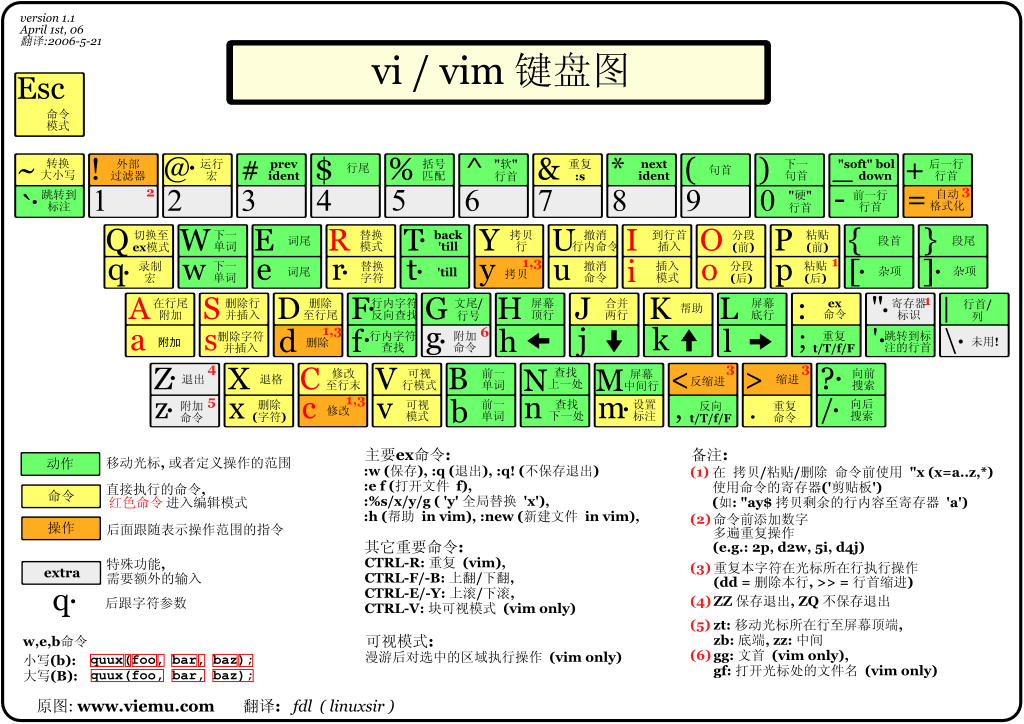
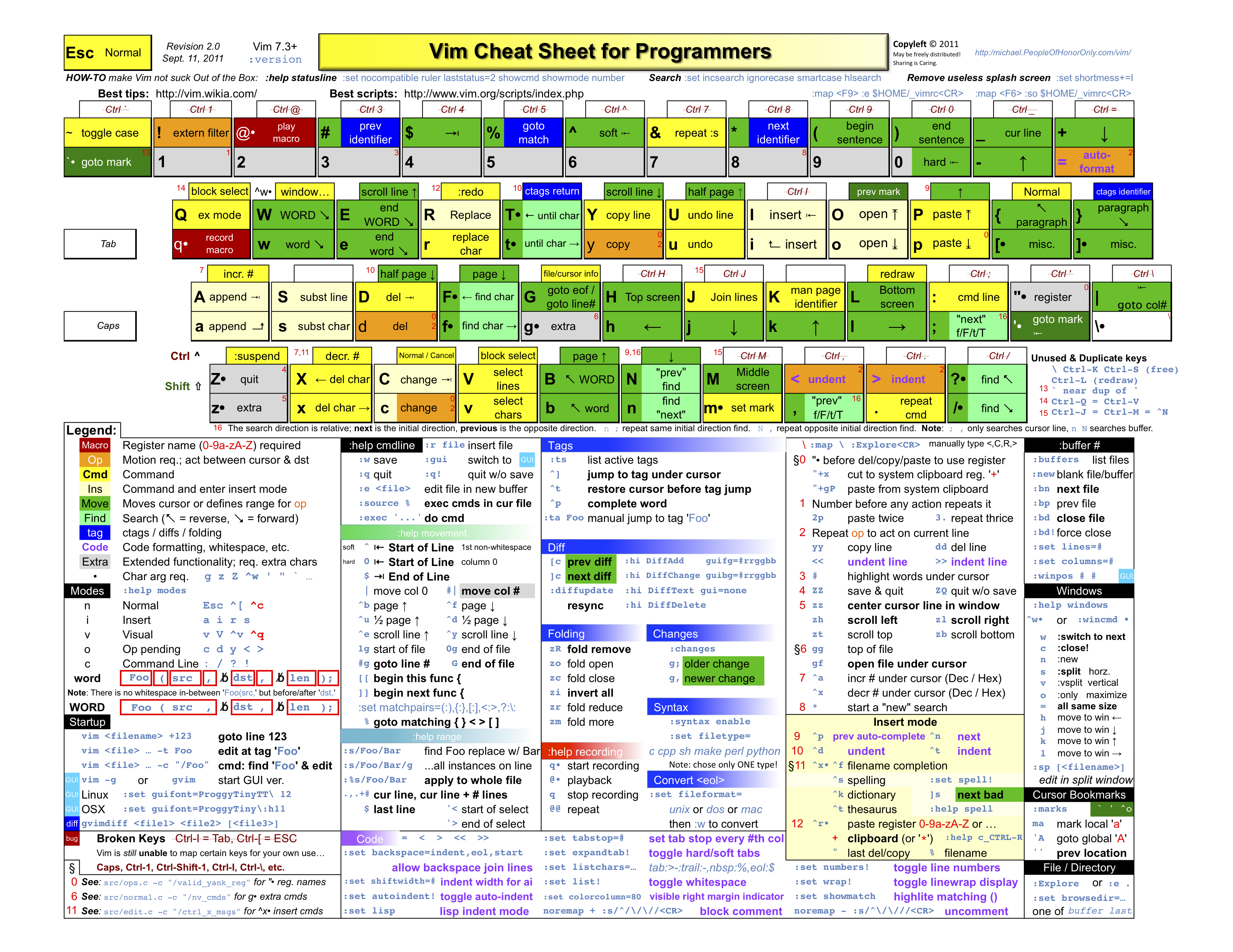
cheat sheet

More advanced details

basic mode

  • : to change mode?
  • / to search
  • ? to up search
  • * to search cursor current word

replace

1
:{作用范围}s/{目标字符}/{替换的字符}/{替换标志}
  • 作用范围:用于指定替换的范围,
    • 1,3表示替换第一行至第三行,
    • 1,$表示替换第一行到最后一行,也可以直接用%表示。
  • 替换标志(可以组合使用):
    • c: confirm,每次替换前都会询问
    • e:不显示error
    • g: globe,不询问,整个替换
    • i: ignore,即不区分大小写

分屏

  1. 创建空白分屏 :new
  2. 打开当前文件 ???
    1. 命令(水平): [CTRL] [W] s
    2. 命令(垂直): [CTRL] [W] v
  3. 打开任意文件
    1. 命令(水平): :split [FILENAME] #或 :sp [FILENAME]
    2. 命令(垂直): :vsplit [FILENAME] #或 :vs [FILENAME]
  4. 关闭
    1. 取消其它分屏,只保留当前分屏 :only
    2. 或者 [CTRL] W o
    3. 退出当前所在分屏 :q #或者: :quit

usefully tricks

comment block text

teminal read code

ctags + 函数跳转

  1. 安装ctags sudo apt-get install exuberant-ctags
  2. 生成函数名索引文件 ctags -R . /path/another/include will generate tags file

添加

1
2
3
4
echo "set tags=$PWD/tags" >> ~/.vimrc
# or
vim ~/.vimrc
# set tags=~/Download/llvm-project-main/llvm/tags

vim 使用

1
2
Ctrl + ] # forword
Ctrl + t # 返回

Further: other ides

huawei programming : dev machine 使用tmux和zsh可以实现统一的开发环境

参考文献

Github Access

导言

作为程序员,最经常遇到的问题就是无法访问github,这无异于和世界断开连接。

  1. 由于http代理可以代理DNS请求,所以不太可能是DNS污染的问题。
  2. github加速访问两种思路:
    1. VPN加速
    2. warp或者wg转发到墙外(linux 服务器)
  3. 之前能访问,但是现在不能访问,可能是wg配置重启掉了。

Proxy in terminal

ssh config

linux下通过按照如下修改.ssh/config设置账号密码,并 ssh -vT git@github.com,成功后输出Hi Kirrito-k423! You've successfully authenticated, but GitHub does not provide shell access.

1
2
3
4
5
6
7
8
9
10
11
12
13
14
15
# .ssh/config
Host github.com
User 943648187@qq.com
Hostname ssh.github.com
PreferredAuthentications publickey
ProxyCommand nc -X 5 -x 127.0.0.1:7890 %h %p #如果通过代理需要这句话
IdentityFile ~/.ssh/id_rsa
Port 443

Host *
# Win报错取消下面三行 getpeername failed: Not a socket getsockname failed: Not a socket
ControlMaster auto
ControlPath /tmp/sshcontrol-%C
ControlPersist 1d
ServerAliveInterval 30

Windows PowerShell 平台

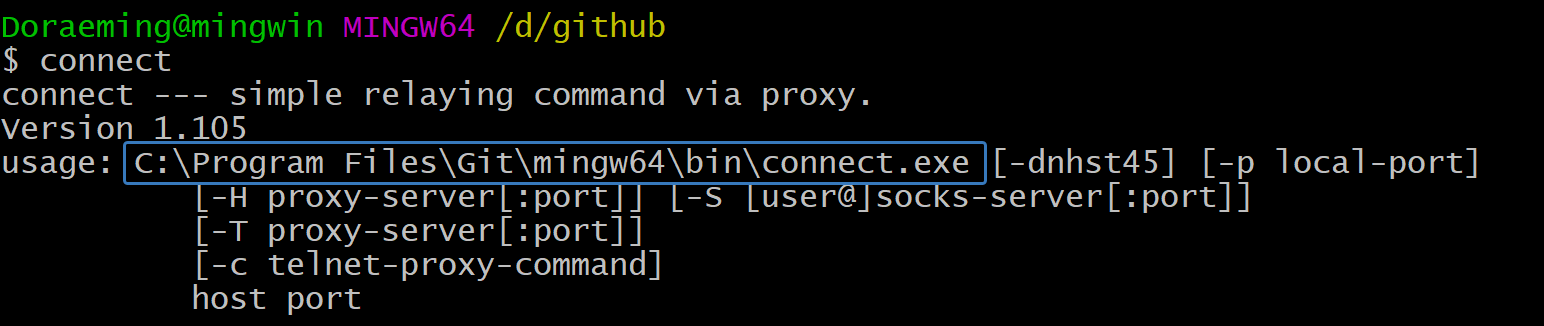
假如是windows下,如果安装了git bash,会有connect.exe的程序

配置如下[^1]

1
2
3
4
5
6
7
8
9
10
11
12
13
14
15
16
17
Host github.com
User git
Port 22
Hostname github.com
# 注意修改路径为你的路径
IdentityFile "C:\Users\Administrator\.ssh\id_rsa"
TCPKeepAlive yes
# 这里的 -a none 是 NO-AUTH 模式,参见 https://bitbucket.org/gotoh/connect/wiki/Home 中的 More detail 一节
ProxyCommand E:\\commonSoftware\\Git\\mingw64\\bin\\connect.exe -S 127.0.0.1:7890 -a none %h %p

Host ssh.github.com
User git
Port 443
Hostname ssh.github.com
# 注意修改路径为你的路径
IdentityFile "C:\Users\Administrator\.ssh\id_rsa"
TCPKeepAlive yes

debug ssh clone/push

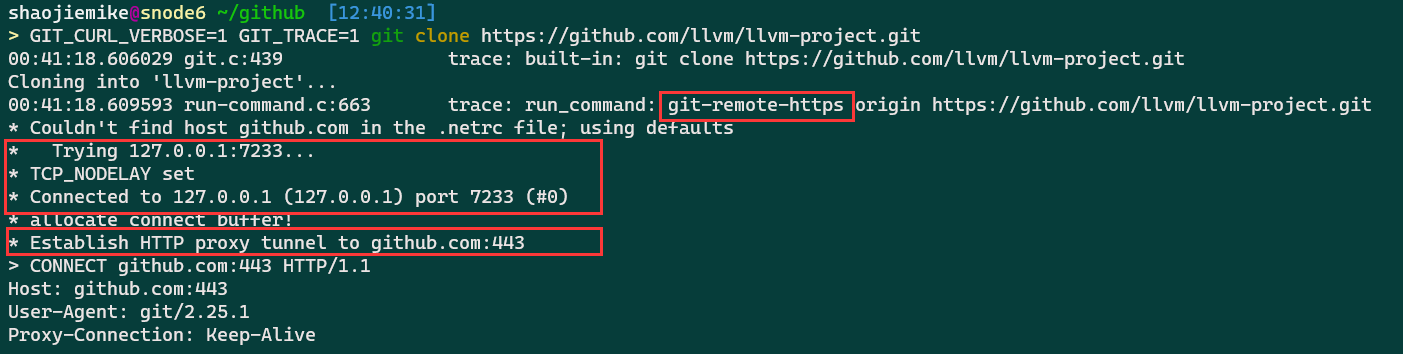
ssh-git 与 https-git的不同

1
2
3
4
git config --global http.proxy localhost:7890 # PowerShell proxy
git config --global http.proxy "http://127.0.0.1:7890"
git config --global https.proxy "http://127.0.0.1:7890"
GIT_CURL_VERBOSE=1 GIT_TRACE=1 git clone git@github.com:Kirrito-k423/autoUpdateIpconfigPushGithub.git

1
GIT_CURL_VERBOSE=1 GIT_TRACE=1 git clone https://github.com/llvm/llvm-project.git

Windows PowerShell 平台 git push –verbose

不同于linux平台的GIT_TRACE=1 git push,Windows PowerShell 平台应该如下设置:

1
2
3
$env:GIT_CURL_VERBOSE = 1
$env:GIT_TRACE = 1
git push

ssh成功,但是git操作还是失败

没使用上指定config文件,git操作需要明确指定。

1
2
$env:GIT_SSH_COMMAND = 'ssh -F /path/to/your/ssh_config'
git push

http代理

There are tons of identical solutions over the internet for defining proxy tunnel for git’s downloads like this one, which all is by setting git’s https.proxy & http.proxy config. but those answers are not working when you try to clone/push/pull etc. over the ssh protocol!

For example, by setting git config --global https.proxy socks5://127.0.0.1:9999 when you try to clone git clone git@github.org:user/repo.git it does not go through the defined sock5 tunnel!

环境实在是只有https代理, 可以利用github_token的https协议

1
2
3
4
5
6
7
8
9
10
11
12
13
14
15
16
17
18
19
20
21
22
23
24
25
# Method 1. git http + proxy http
git config --global http.proxy "http://127.0.0.1:1080"
git config --global https.proxy "http://127.0.0.1:1080"

# Method 2. git http + proxy shocks
git config --global http.proxy "socks5://127.0.0.1:1080"
git config --global https.proxy "socks5://127.0.0.1:1080"

# to unset
git config --global --unset http.proxy
git config --global --unset https.proxy

# Method 3. git ssh + proxy http
vim ~/.ssh/config
Host github.com
HostName github.com
User git
ProxyCommand socat - PROXY:127.0.0.1:%h:%p,proxyport=1087

# Method 4. git ssh + proxy socks
vim ~/.ssh/config
Host github.com
HostName github.com
User git
ProxyCommand nc -v -x 127.0.0.1:1080 %h %p

%h %phostpost的意思

或者

After some visiting so many pages, I finally find the solution to my question:

1
2
3
4
5
6
7
8
9
10
11
12
# [step 1] create a ssh-proxy
ssh -D 9999 -qCN user@server.net

# [step 2] make git connect through the ssh-proxy
# [current script only]
export GIT_SSH_COMMAND='ssh -o ProxyCommand="connect -S 127.0.0.1:9999 %h %p"'
# OR [git global setting]
git config --global core.sshCommand 'ssh -o ProxyCommand="connect -S 127.0.0.1:9999 %h %p"'
# OR [one-time only use]
git clone -c=core.sshCommand 'ssh -o ProxyCommand="connect -S 127.0.0.1:9999 %h %p"' git@github.com:user/repo.git
# OR [current repository use only]
git config core.sshCommand 'ssh -o ProxyCommand="connect -S 127.0.0.1:9999 %h %p"'

To install connect on Ubuntu:

1
sudo apt install connect-proxy

ssh代理

1
2
3
4
5
ssh -vT -o "ProxyCommand connect -S 127.0.0.1:7890 %h %p" git@github.com
ssh -vT -o "ProxyCommand nc -X 5 -x 127.0.0.1:7890 %h %p" git@github.com
# 使用HTTP 代理
ssh -o ProxyCommand='corkscrew proxy.net 8888 %h %p' user@server.net
ssh -o ProxyCommand='proxytunnel -p proxy.net:8888 -P username -d %h:%p' user@server.net

Wireguard 代理

post request forward is an all-in-one solution.

1
2
3
4
5
6
7
8
9
10
11
interface: warp
public key: fcDZCrGbcpz3sKFqhBw7PtdInygUOtEJfPAs08Wwplc=
private key: (hidden)
listening port: 51825

peer: bmXOC+F1FxEMF9dyiK2H5/1SUtzH0JuVo51h2wPfgyo=
endpoint: [2606:4700:d0::a29f:c001]:1701
allowed ips: 172.16.0.0/24, 0.0.0.0/0, ::/0
latest handshake: 89 days, 23 hours, 15 minutes, 28 seconds ago
transfer: 3.51 GiB received, 1.71 GiB sent
persistent keepalive: every 25 seconds

latest handshake: 89 days ago demonstrate wg is done for a long time. At the same time mtr github.com shows no output prove the bad situation.

STEP1: first try is to bring the wg-proxy up again

1
2
3
4
python register.py #自动生成warp-op.conf,warp.conf和warp-helper
mv warp-helper /etc/default
vim /etc/config/network #填写warp-op.conf内容,修改只用替换option private_key 和 ipv6 的 list addresses 即可
ifup warp #启动warp, 代替wg-quick up warp.conf

and test brainiac machine is back online

常见情形

大文件提交

Sometimes,it‘s the big log fault.

1
2
3
4
5
6
7
8
9
10
11
# find file
find . -type f -name "zsim.log.0" -size +10M
# find the most repeated lines
head -n 10000 your_file.txt | sort | uniq -c | sort -nr | head
# delete partten line in files
sed -i '/\[S 0\] WARN: \[6\] ContextChange, reason SIGRETURN, inSyscall 1/d' /staff/shaojiemike/github/PIA_huawei/log/zsim/chai-n/hsti/1000/cpu_tlb/zsim.log.0

# conbine two command
find . -type f -name "zsim.log.0" -size +10M -print0 | xargs -0 sed -i '/字符串模式/d'
# or just save the tail (sth wrong needed test)
find . -type f -name "zsim.log.0" -size +1M -exec bash -c 'tail -n 2000 "$1" > "$1"_back ' _ {} \;

请求被拦截

1
2
3
4
t00906153@A2305023964 MINGW64 ~/github
$ git clone https://github.com/jeremy-rifkin/cpptrace.git
Cloning into 'cpptrace'...
fatal: unable to access 'https://github.com/jeremy-rifkin/cpptrace.git/': SSL certificate problem: self-signed certificate in certificate chain

常见问题

error

出现于使用https协议,下载大仓库时,出现该错误。

  1. 首先使用retry脚本,多重试。
  2. 脚本中有http下载的限制修改。
  3. 使用depth=1参数,只下载最新提交。之后下好后能适应unshallow复原
  4. 使用更快的https代理。 e.g., 华为xgate使用HK或者Auto

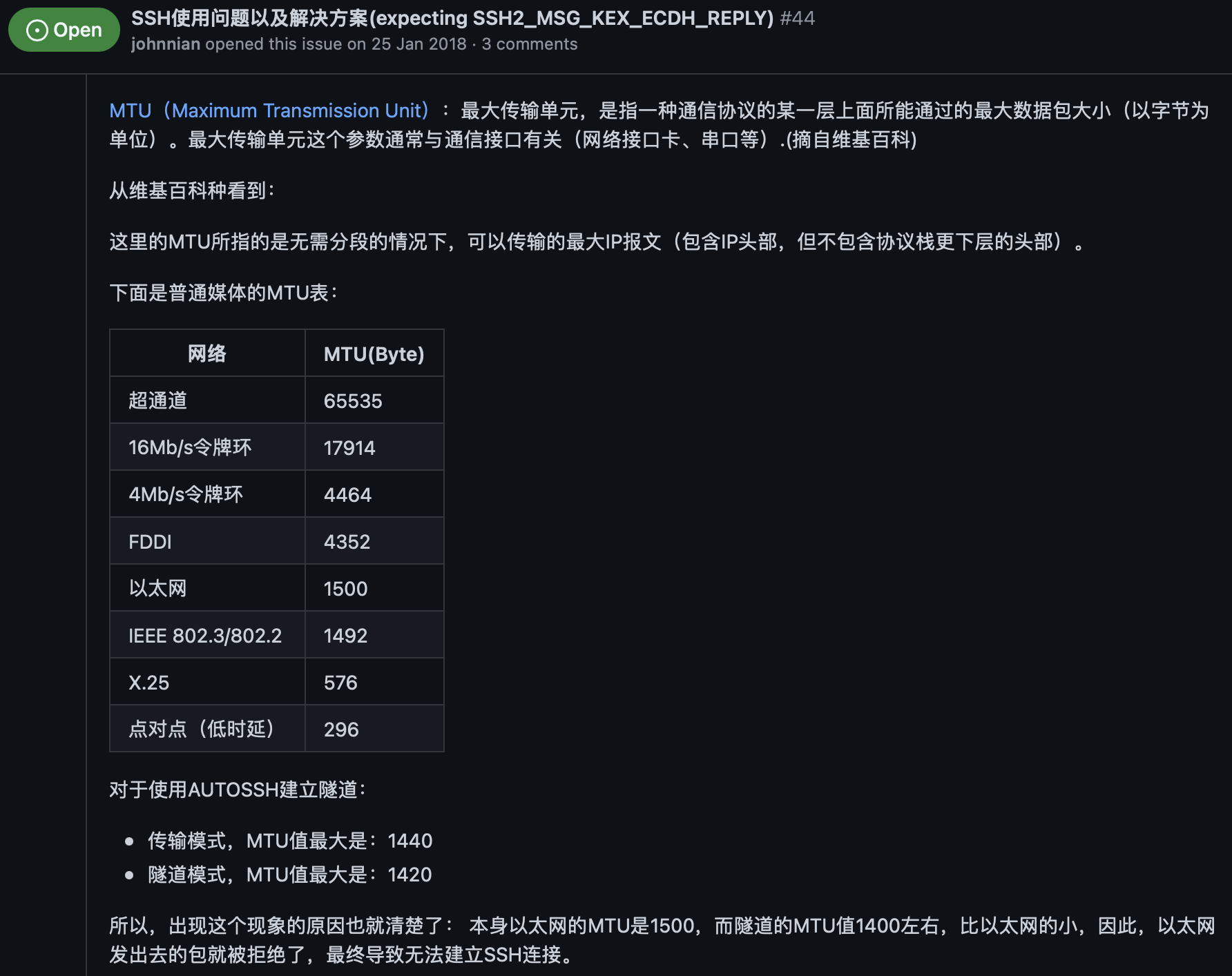
expecting SSH2_MSG_KEX_ECDH_REPLY

设置mtu解决:

STEP1:

1
2
3
4
5
6
7
8
9
10
eno0: flags=4163<UP,BROADCAST,RUNNING,MULTICAST>  mtu 1500
inet 202.38.73.217 netmask 255.255.255.0 broadcast 202.38.73.255
inet6 fe80::ae1f:6bff:fe8a:e4ba prefixlen 64 scopeid 0x20<link>
inet6 2001:da8:d800:811:ae1f:6bff:fe8a:e4ba prefixlen 64 scopeid 0x0<global>
inet6 2001:da8:d800:730:ae1f:6bff:fe8a:e4ba prefixlen 64 scopeid 0x0<global>
ether ac:1f:6b:8a:e4:ba txqueuelen 1000 (以太网)
RX packets 12345942 bytes 2946978044 (2.9 GB)
RX errors 0 dropped 1438318 overruns 0 frame 0
TX packets 4582067 bytes 675384424 (675.3 MB)
TX errors 0 dropped 0 overruns 0 carrier 0 collisions 0

STEP2:

1
ifconfig eno0 mtu 1200

STEP3:

1
2
3
4
[root@localhost ~]# vi /etc/sysconfig/network-scripts/ifcfg-eno0
MTU=1200 #MTU设置

[root@localhost ~]# systemctl restart network

参考文献

MPI

简介

  • Message Passing Interface (消息传递接口 MPI) is a standardized and portable message-passing standard designed to function on parallel computing architectures.[1]
  • The MPI standard defines the syntax 语法 and semantics 语意 of library routines that are useful to a wide range of users writing portable message-passing programs in C, C++, and Fortran.
  • There are several open-source MPI implementations (MPICH,Open MPI), which fostered the development of a parallel software industry, and encouraged development of portable and scalable large-scale parallel applications.

历史

  • 1994.6 MPI-1
    • 主要的MPI-1模型没有共享内存的概念,
    • point-to-point send/recieve, gather/reduce, synchronous, asynchronous,
  • MPI-2只有一个有限的分布式共享内存的概念。尽管如此,MPI程序通常在共享内存计算机上运行,MPICH和Open MPI都可以使用共享内存进行消息传输(如果可用的话)。
  • 围绕MPI模型(与显式共享内存模型相反)设计程序在NUMA体系结构上运行时具有优势,因为MPI鼓励内存局部性。显式共享内存编程是在MPI-3中引入的。

实现原理简介

虽然MPI属于OSI参考模型的第5层和更高层,但实现可以覆盖大多数层,其中在传输层中使用套接字和传输控制协议(TCP)。

与RDMA的区别

MPI hardware research focuses on implementing MPI directly in hardware, for example via processor-in-memory, building MPI operations into the microcircuitry of the RAM chips in each node. By implication, this approach is independent of language, operating system, and CPU, but cannot be readily updated or removed.
MPI硬件研究的重点是直接在硬件中实现MPI,例如通过内存处理器,将MPI操作构建到每个节点中的RAM芯片的微电路中。通过暗示,这种方法独立于语言、操作系统和CPU,但是不能容易地更新或删除。

Another approach has been to add hardware acceleration to one or more parts of the operation, including hardware processing of MPI queues and using RDMA to directly transfer data between memory and the network interface controller(NIC 网卡) without CPU or OS kernel intervention.
另一种方法是将硬件加速添加到操作的一个或多个部分,包括MPI队列的硬件处理以及使用RDMA在存储器和网络接口控制器之间直接传输数据,而无需CPU或OS内核干预。

与管道的区别

进程间通信都是Inter-process communication(IPC)的一种。常见有如下几种:

  1. 文件,进程写文件到磁盘,其余进程能并行读取。
    1. Memory-mapped file 存储在内存里的文件
  2. signal,多为控制信号
  3. 信号量(计数器)
  4. Network Socket
  5. Message queue 消息队列(没用过
  6. 管道
    1. Anonymous pipe 匿名管道(命令行的结果传递|
      1. 可用于单向进程间通信(IPC)的单FIFO通信通道
      2. A unidirectional data channel using standard input and output.
    2. named pipe 有名管道
      1. 持久化,mkfifo,具有p的文件属性
      2. cat tail的例子说明,不建立写读连接会阻塞。
  7. Shared memory 共享内存(OpenMP
  8. Message passing 消息传递(类似MPI

与OpenMP的关系

线程共享存储器编程模型(如Pthreads和OpenMP)和消息传递编程(MPI/PVM)可以被认为是互补的,并且有时在具有多个大型共享存储器节点的服务器中一起使用。

基本概念

后四个是MPI-2独有的

  1. Communicator 进程组
  2. Point-to-point basics 点对点同步异步通信
  3. Collective basics 集体通信(eg. alltoall
  4. Derived data types 派生数据类型(自定义传输数据结构
  5. One-sided communication
    1. MPI-2定义了三个单边通信操作,分别是对远程存储器的写入、从远程存储器的读取以及跨多个任务对同一存储器的归约操作。
  6. Dynamic process management 类似进程池?没用过
  7. 并行文件IO

编程

C++ 查看在哪个节点

1
2
3
4
#include <unistd.h>
char hostname[100];
gethostname(hostname,sizeof(hostname));
printf( "Hello world from process %d of %d: host: %s\n", rank, size, hostname);

运行命令

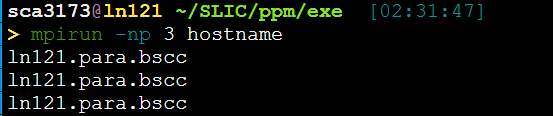
输出X个当前机器hostname

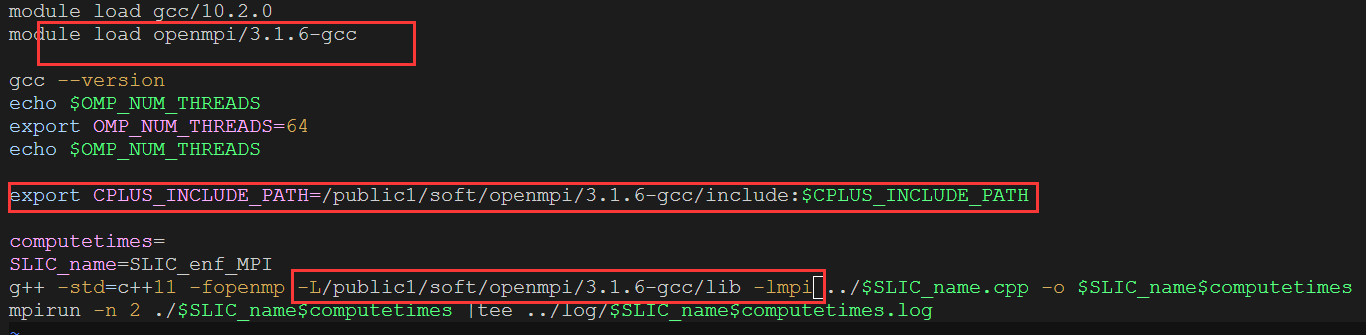
mpirun -np 6 -machinefile ./machinelist ./a.out 即可多节点执行。

问题

MPI_Finalize()之后 ,MPI_Init()之前
https://www.open-mpi.org/doc/v4.0/man3/MPI_Init.3.php

不同的进程是怎么处理串行的部分的?都执行(重复执行?)。执行if(rank=num),那岂不是还要同步MPI_Barrier()。

而且写同一个文件怎么办?

对等模式和主从模式

MPI的两种最基本的并行程序设计模式 即对等模式和主从模式。

  对等模式:各个部分地位相同,功能和代码基本一致,只不过是处理的数据或对象不同,也容易用同样的程序来实现。

  主从模式:分为主进程和从进程,程序通信进程之间的一种主从或依赖关系 。MPI程序包括两套代码,主进程运行其中一套代码,从进程运行另一套代码。
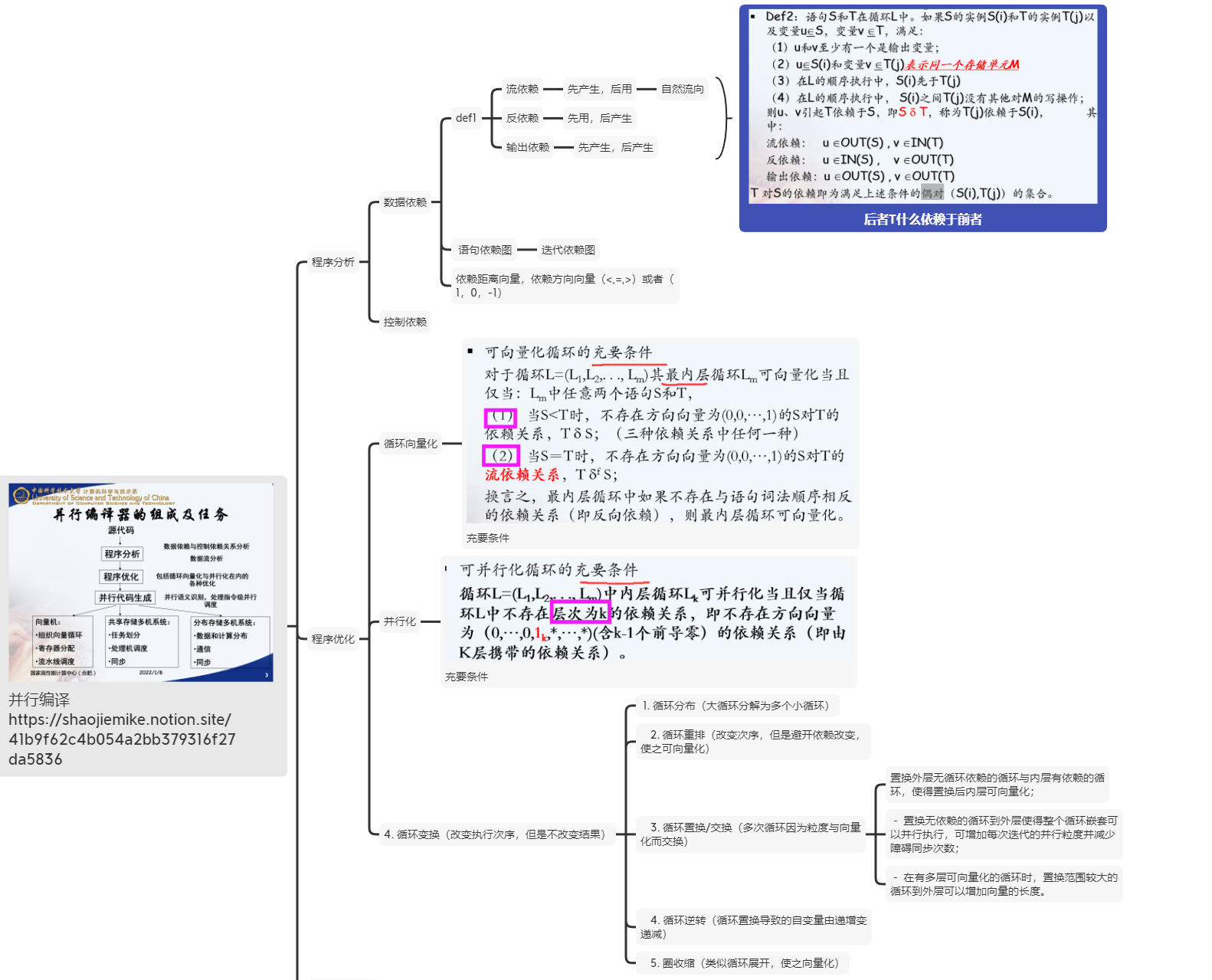
程序并行可行性分析


圈收缩(cycle shrinking)-此变换技术一般用于依赖距离大于1的循环中,它将一个串行循环分成两个紧嵌套循环,其中外层依然串行执行,而内层则是并行执行(一般粒度较小)

https://shaojiemike.notion.site/41b9f62c4b054a2bb379316f27da5836

MPI消息

预定义类型消息——特殊MPI_PACKED

MPI_PACKED预定义数据类型被用来实现传输地址空间不连续的数据项 。

1
2
3
4
5
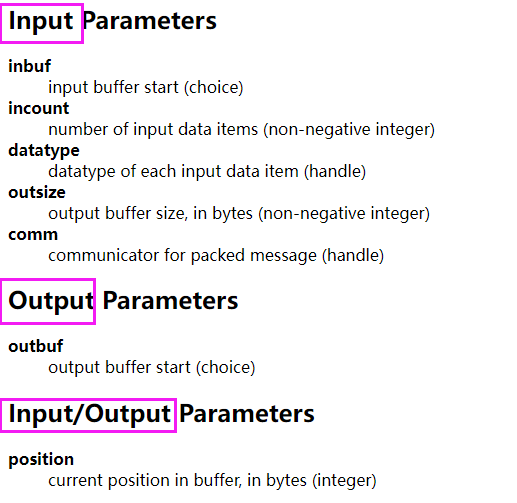
int MPI_Pack(const void *inbuf,
int incount,
MPI_Datatype datatype, void *outbuf, int outsize, int *position, MPI_Comm comm)
int MPI_Unpack(const void *inbuf, int insize, int *position,
void *outbuf, int outcount, MPI_Datatype datatype, MPI_Comm comm)


The input value of position is the first location in the output buffer to be used for packing. position is incremented by the size of the packed message,

and the output value of position is the first location in the output buffer following the locations occupied by the packed message. The comm argument is the communicator that will be subsequently used for sending the packed message.

1
2
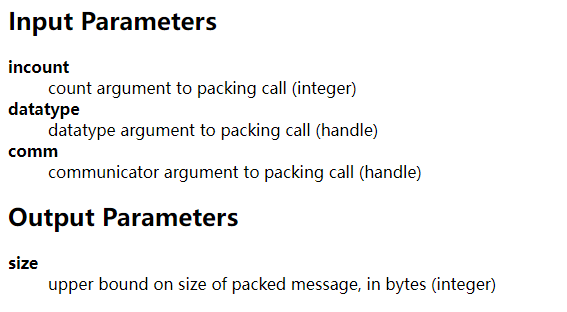
//Returns the upper bound on the amount of space needed to pack a message
int MPI_Pack_size(int incount, MPI_Datatype datatype, MPI_Comm comm, int *size)


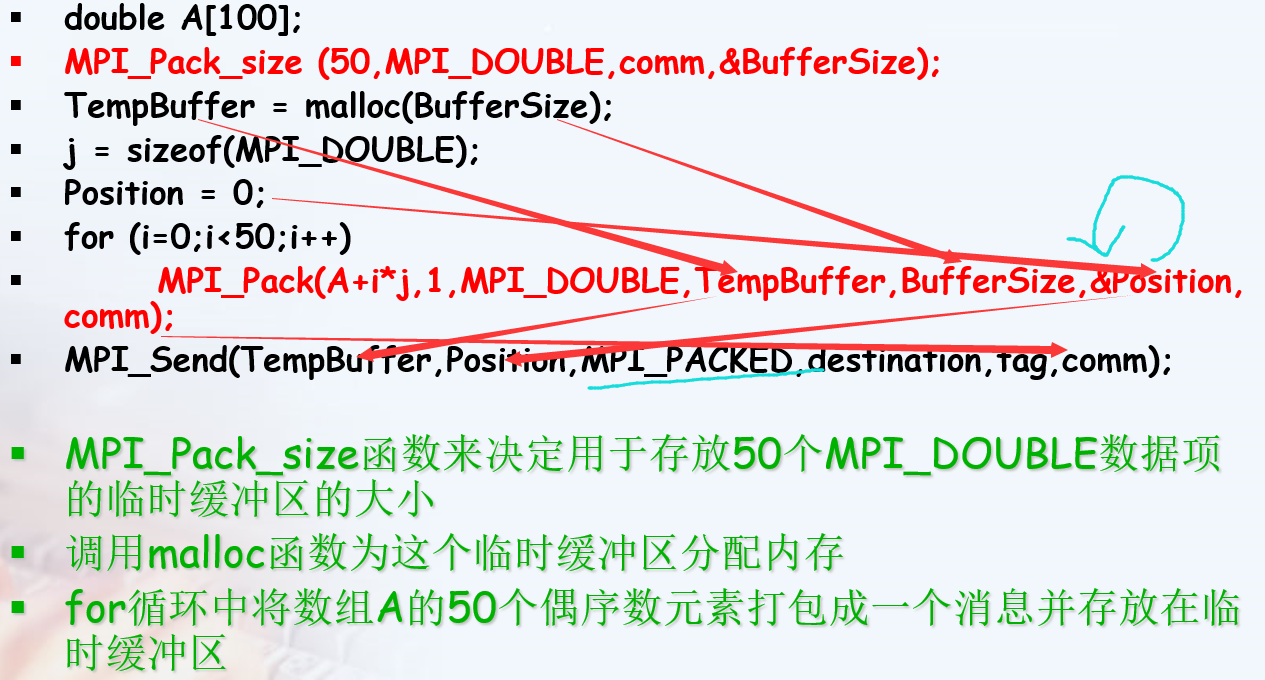
例子:

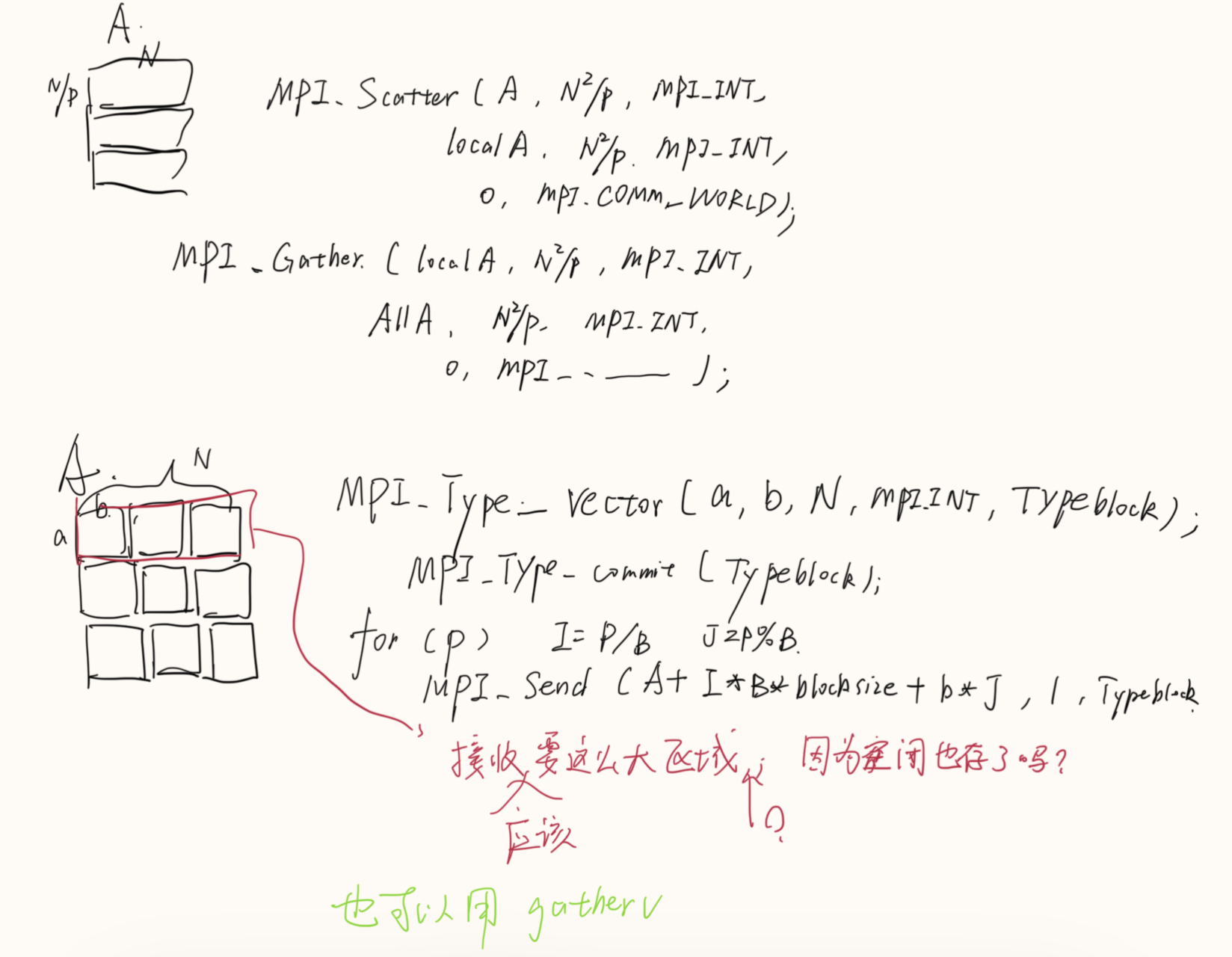
这里的A+i*j应该写成A+i*2吧???

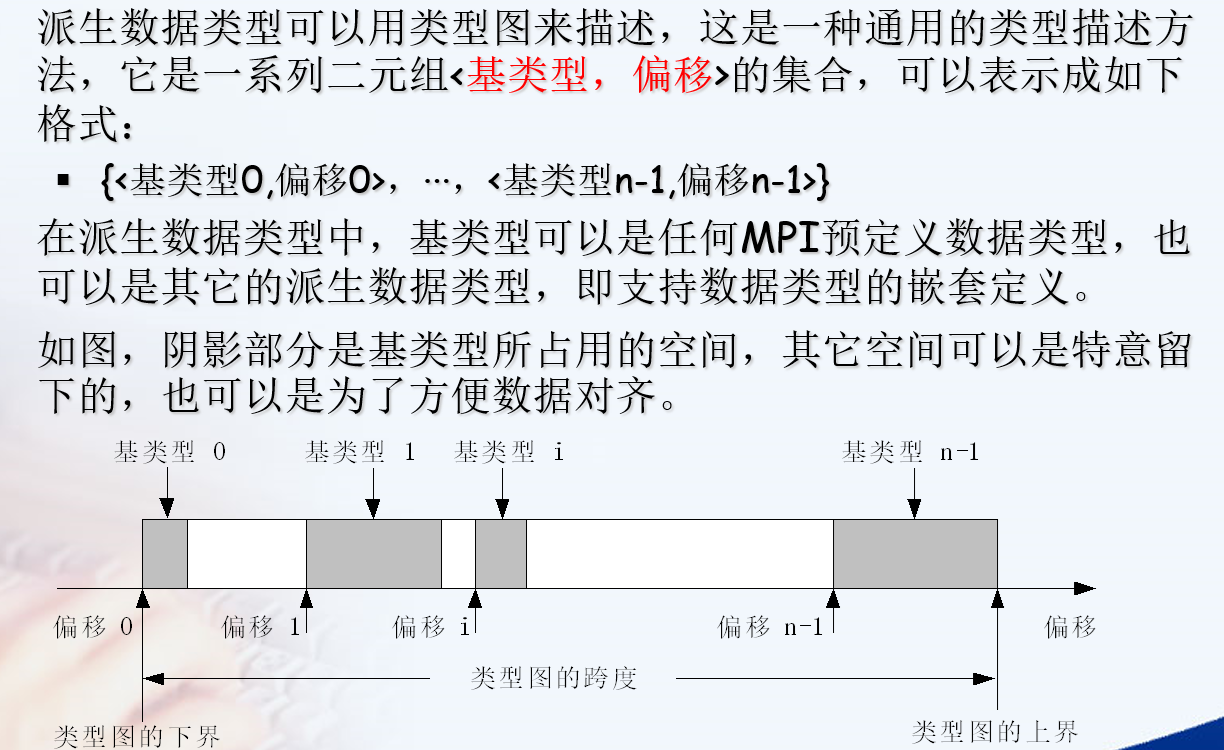
派生数据类型(Derived Data Type)

来定义由数据类型不同且地址空间不连续的数据项组成的消息。

1
2
3
4
5
6
7
8
//启用与弃用数据类型
int MPI_Type_commit(MPI_Datatype * datatype)
int MPI_Type_free(MPI_Datatype * datatype)
//相同数据类型
int MPI_Type_contiguous(int count, MPI_Datatype oldtype, MPI_Datatype * newtype)
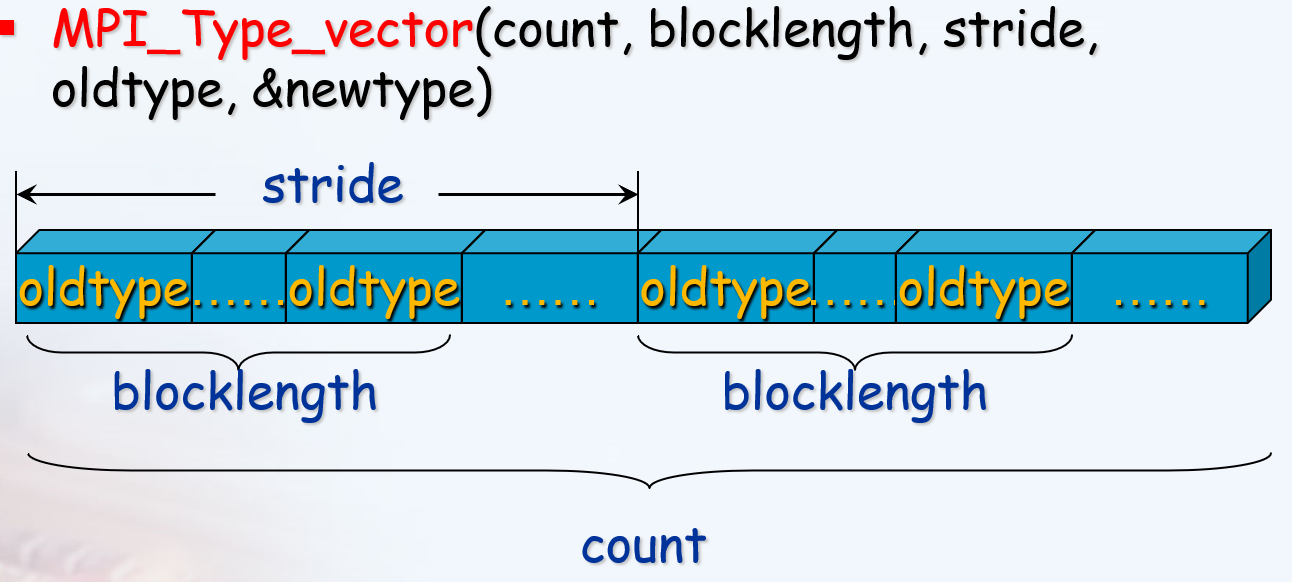
//成块的相同元素组成的类型,块之间具有相同间隔
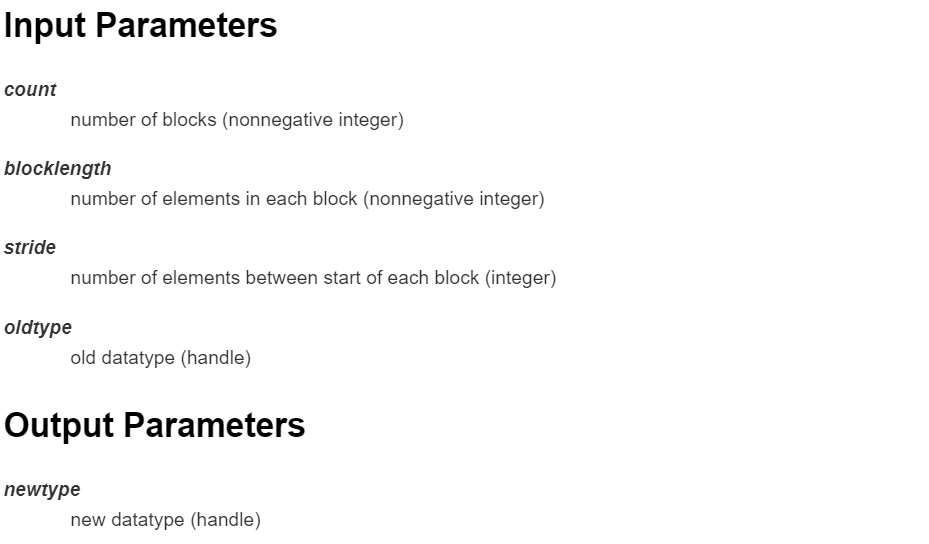
int MPI_Type_vector(int count,
int blocklength, int stride, MPI_Datatype oldtype, MPI_Datatype * newtype)

1
2
3
4
5
6
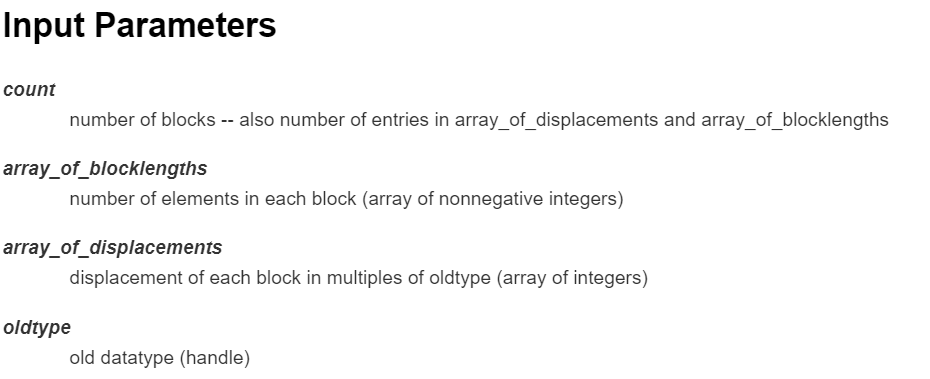
//成块的相同元素组成的类型,块长度和偏移由参数指定
int MPI_Type_indexed(int count,
const int *array_of_blocklengths,
const int *array_of_displacements,
MPI_Datatype oldtype, MPI_Datatype * newtype)

1
2
3
4
5
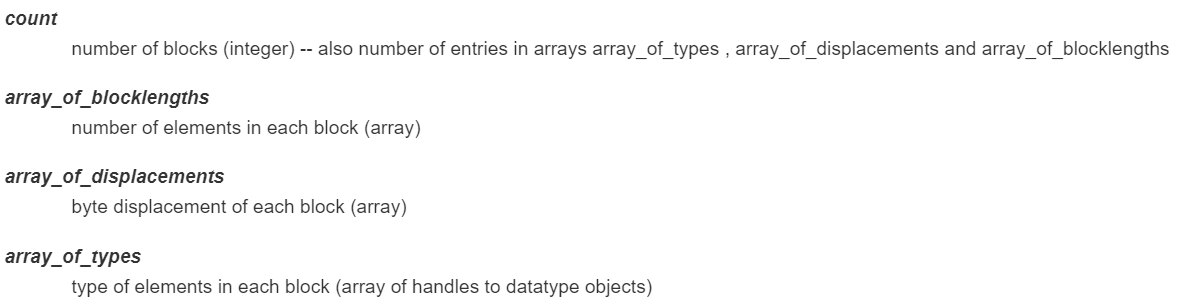
//由不同数据类型的元素组成的类型, 块长度和偏移(肯定也不一样)由参数指定
int MPI_Type_struct(int count,
int *array_of_blocklengths,
MPI_Aint * array_of_displacements,
MPI_Datatype * array_of_types, MPI_Datatype * newtype)

通讯域映射为网格表示

MPI_Cart_create
确定了虚拟网络每一维度的大小后,需要为这种拓扑建立通信域。组函数MPI_Cart_create可以完成此任务,其声明如下:

1
2
3
4
5
6
7
8
9
10
11
12
13
14
15
16
17
// Makes a new communicator to which topology拓扑 information has been attached
int MPI_Cart_create(
MPI_Comm old_comm,//旧的通信域。这个通讯域中的所有进程都要调用该函数
int dims,//网格维数 number of dimensions of cartesian grid (integer)
int* size,//长度为dims的数组,size[j]是第j维的进程数, integer array of size ndims specifying the number of processes in each dimension
int* periodic,//长度为dims的数组,如果第j维有周期性,那么periodic[j]=1,否则为0
int reorder,//进程是否能重新被编号,如果为0则进程在新的通信域中仍保留在旧通信域的标号
MPI_Comm* cart_comm//该函数返回后,此变量将指向新的笛卡尔通信域
);

int MPI_Cart_rank(MPI_Comm comm, const int coords[], int *rank)
//Determines process rank in communicator given Cartesian location
//该函数的作用是通过进程在网格中的坐标获得它的进程号

int MPI_Cart_coords(MPI_Comm comm, int rank, int maxdims, int coords[])
//Determines process coords in cartesian topology given rank in group
//该函数的作用是确定某个线程在虚拟网格中的坐标

通信域划分

1
2
3
4
5
6
int MPI_Comm_create(MPI_Comm comm, MPI_Group group, MPI_Comm * newcomm)
//Creates a new communicator

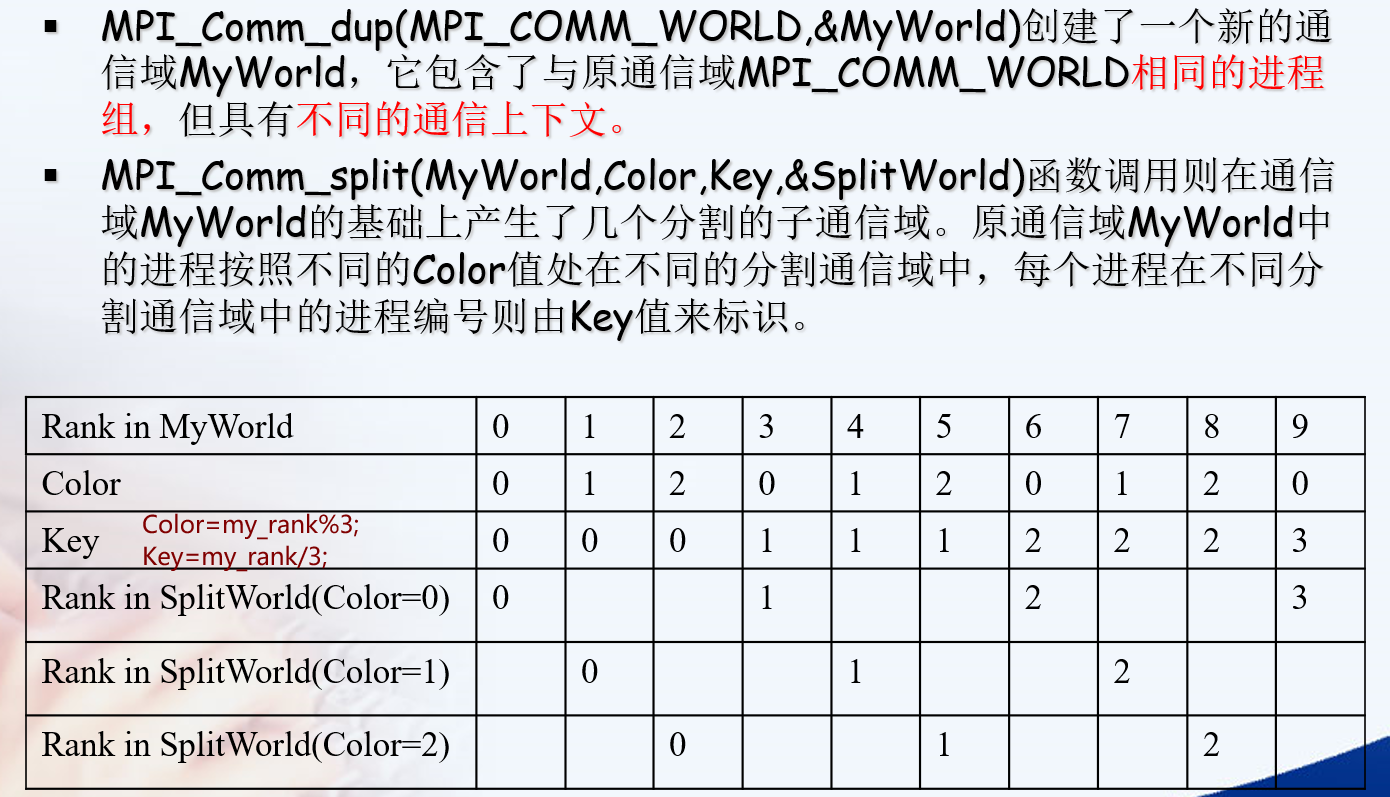
int MPI_Comm_split(MPI_Comm comm, int color, int key, MPI_Comm * newcomm)
将某个通信域进一步划分为几组

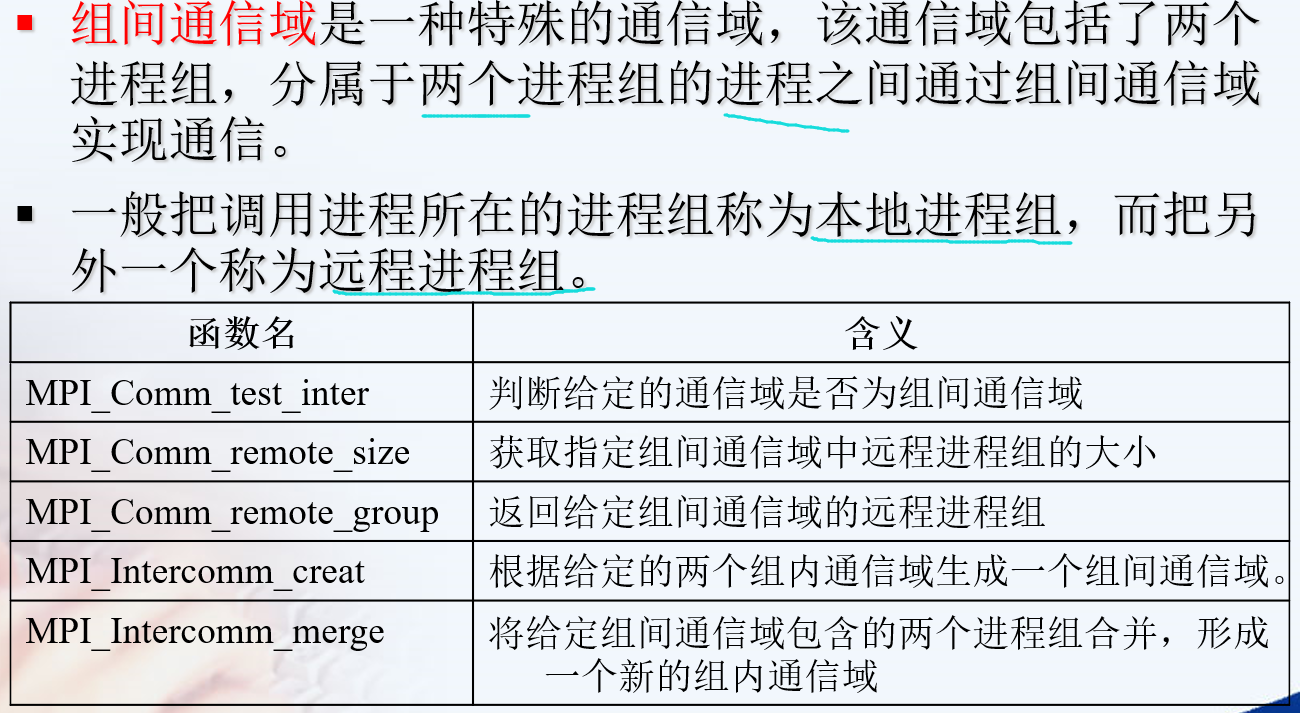
组间通信域

点对点通信


特殊的函数

1
2
3
4
5
6
7
int MPI_Sendrecv(const void *sendbuf, int sendcount, MPI_Datatype sendtype,
int dest, int sendtag,
void *recvbuf, int recvcount, MPI_Datatype recvtype,
int source, int recvtag, MPI_Comm comm, MPI_Status * status)
int MPI_Sendrecv_replace(void *buf, int count, MPI_Datatype datatype,
int dest, int sendtag, int source, int recvtag,
MPI_Comm comm, MPI_Status * status)

特别适用于在进程链(环)中进行“移位”操作,而避免在通讯为阻塞方式时出现死锁。

There is also another error. The MPI standard requires that the send and the receive buffers be disjoint不相交 (i.e. they should not overlap重叠), which is not the case with your code. Your send and receive buffers not only overlap but they are one and the same buffer. If you want to perform the swap in the same buffer, MPI provides the MPI_Sendrecv_replace operation.

1
2
3
4
5
6
7
8
9
10
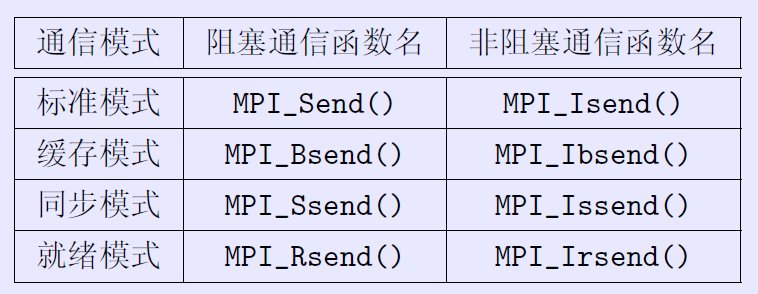
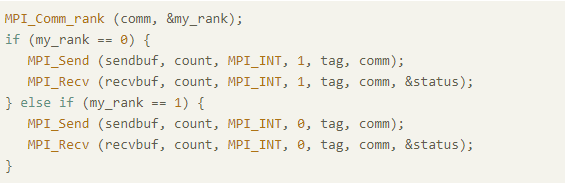
//MPI标准阻塞通信函数,没发出去就不会结束该命令。
MPI_Send(sb, buf_size, MPI_INT, other, 1, MPI_COMM_WORLD);
/*其中sb为发送缓冲区首地址,
buf_size为发送数据量,
MPI_INT 为发送数据的类型,
other为发送目标进程,(发送给other)
1的位置为tag,
MPI_COMM_WORLD为通信子*/
MPI_Recv(rb, buf_size, MPI_INT, other, 1, MPI_COMM_WORLD, &status);
/*与发送类似,从other接收消息,status见下面*/

是否会导致死锁

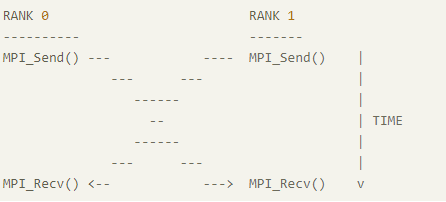
可能大家会想到这会死锁,如下图:

但是实际情况可能并不会死锁,这与调用的MPI库的底层实现有关

MPI_Send将阻塞,直到发送方可以重用发送方缓冲区为止。当缓冲区已发送到较低的通信层时,某些实现将返回给调用方。当另一端有匹配的MPI_Recv()时,其他一些将返回到呼叫者。

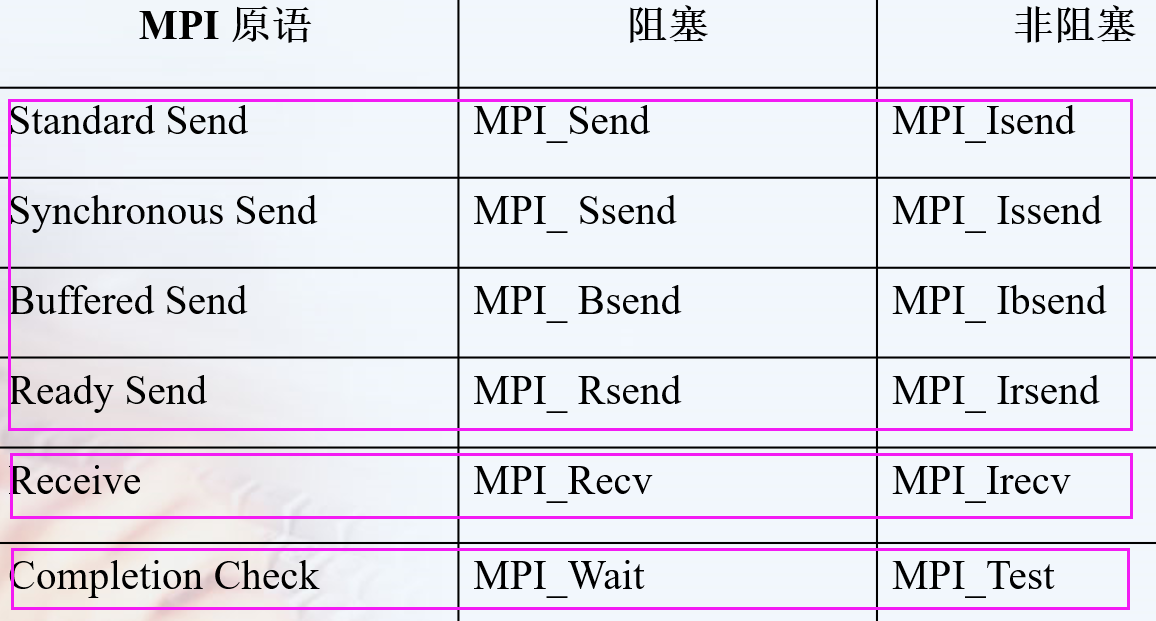
但是为了避免这种情况,可以调换Send与Recv的顺序,或者**使用MPI_Isend()或MPI_Issend()**代替非阻塞发送,从而避免死锁。

梯形积分

1
2
3
4
5
6
7
8
9
10
11
12
13
14
15
16
17
18
19
20
21
22
23
24
25
26
27
28
29
30
31
32
33
34
35
36
37
38
39
40
41
42
43
44
45
46
47
48
49
50
51
52
53
54
55
56
57
58
59
60
61
62
63
64
65
66
67
68
69
70
71
/*
梯形积分法,计算y=sin x 在[0,pi]上的积分
@ trap 梯形积分串行程序
@total_inte 最终积分结果
*/
#include "stdafx.h"
#include <stdio.h>
#include <stdlib.h>
#include <string.h>
#include <iostream>
#include<math.h>
#include "mpi.h"
using namespace std;

const double a = 0.0;
const double b = 3.1415926;
int n = 100;
double h = (b - a) / n;

double trap(double a, double b, int n, double h)
{
double*x = new double[n + 1];
double*f = new double[n + 1];
double inte = (sin(a) + sin(b)) / 2;
for (int i = 1; i<n + 1; i++) {
x[i] = x[i - 1] + h; /*x_0=a,x_n=b*/
f[i] = sin(x[i]);
inte += f[i];
}
inte = inte*h; /* inte=h*[f(a)/2+f(x_1)+...f(x_{n-1})+f(b)/2]*/
return inte;
}

int main(int argc, char * argv[])
{
int myid, nprocs;
int local_n;
double local_a;
double local_b;
double total_inte;

MPI_Init(&argc, &argv);
MPI_Comm_rank(MPI_COMM_WORLD, &myid); /* get current process id */
MPI_Comm_size(MPI_COMM_WORLD, &nprocs); /* get number of processes */

local_n = n / nprocs; //任务划分
local_a = a + myid*local_n*h;
local_b = local_a + local_n*h;
double local_inte = trap(local_a, local_b, local_n, h);

if (myid != 0) //通信结果
{
MPI_Send(&local_inte, 1, MPI_DOUBLE, 0, 0, MPI_COMM_WORLD);
}
else
{
total_inte = local_inte;
for (int i = 1; i<nprocs; i++)
{
MPI_Recv(&local_inte, 1, MPI_DOUBLE, i, 0, MPI_COMM_WORLD, MPI_STATUS_IGNORE);
total_inte += local_inte;
}
}
if (myid == 0)
{
printf("integral output is %d", total_inte);
}
MPI_Finalize();

return 0;
}

群集通讯

一个进程组中的所有进程都参加的全局通信操作。

实现三个功能:通信、聚集和同步。
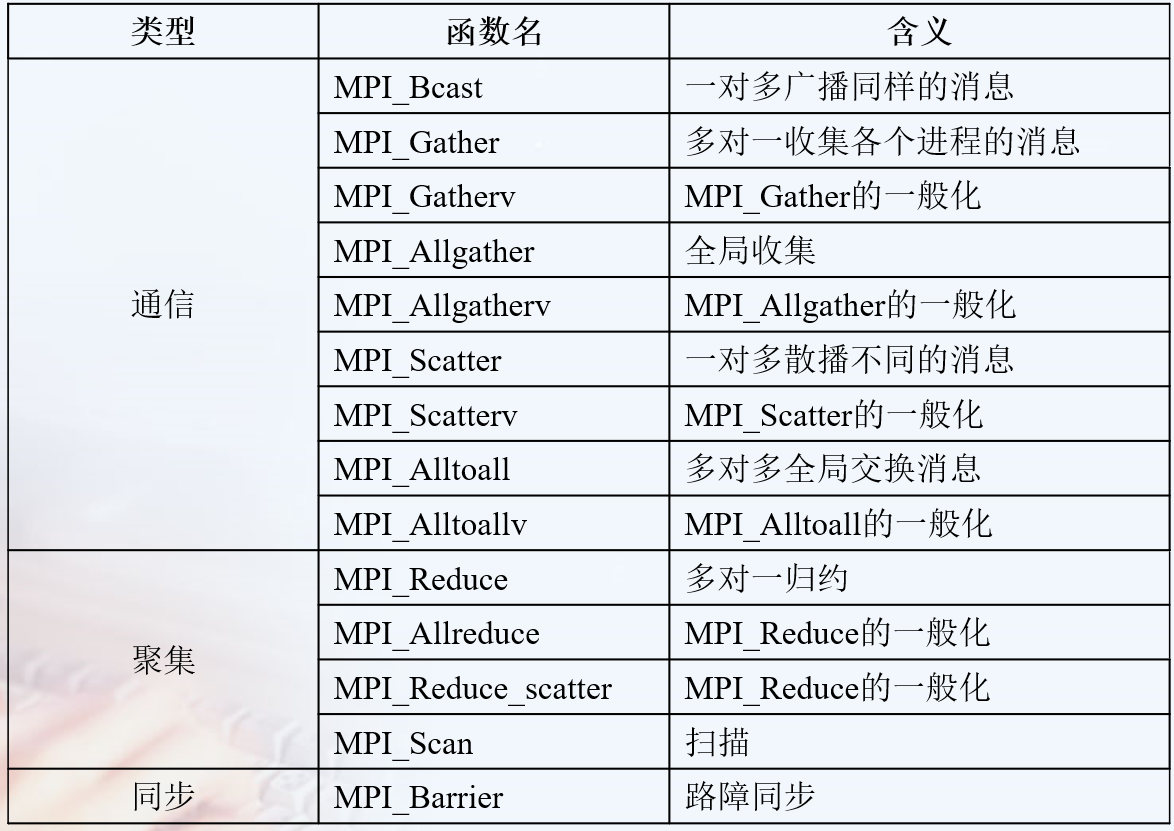
  1. 通信功能主要完成组内数据的传输
  2. 聚集功能在通信的基础上对给定的数据完成一定的操作
  3. 同步功能实现组内所有进程在执行进度上取得一致

常见的通讯

1
2
//将一个进程中得数据发送到所有进程中的广播函数
MPI_Bcast(void* data_p,int count,MPI_Datatype datatype, int scr_process,MPI_Comm comm);

注意data_p在root 或者scr_process进程里是发送缓存也是接收缓存,但是在其余进程里是接收缓存。
MPI_Scatter?
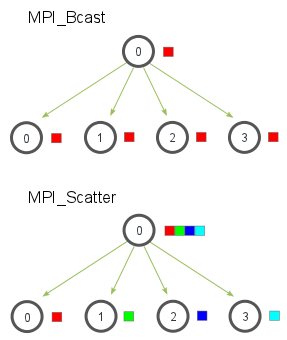
区别

  1. MPI_Scatter与MPI_Bcast非常相似,都是一对多的通信方式,不同的是后者的0号进程将相同的信息发送给所有的进程,而前者则是将一段array的不同部分发送给所有的进程,其区别可以用下图概括:
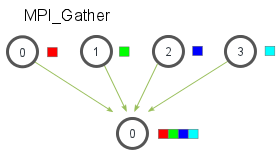
  2. MPI_Gather,作用是从所有的进程中将每个进程的数据集中到根进程中,同样根据进程的编号对array元素排序,
    1. 接收缓冲由三元组<RecvAddress, RecvCount, RecvDatatype>标识,发送缓冲由三元组<SendAddress, SendCount, SendDatatype>标识,所有非Root进程忽略接收缓冲。
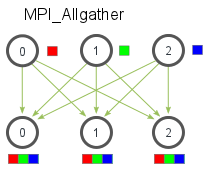
  3. MPI_Allgather 当数据分布在所有的进程中时,MPI_Allgather将所有的数据聚合到每个进程中。
    1. Allgather操作相当于每个进程都作为ROOT进程执行了一次Gather调用,即每一个进程都按照Gather的方式收集来自所有进程(包括自己)的数据。
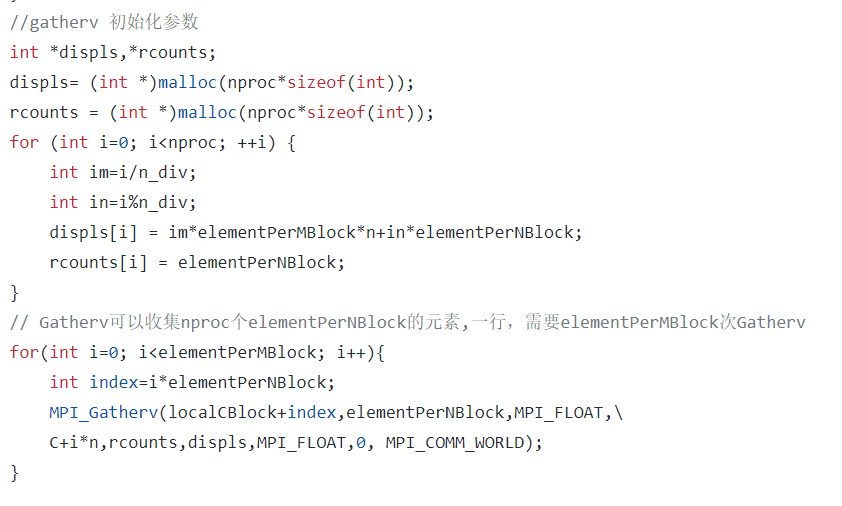
    2. MPI_GATHERV扩展了功能,提供新的参数disp,是一个整数数组,包含存放从每个进程接收的数据相对于recvbuf的偏移地址
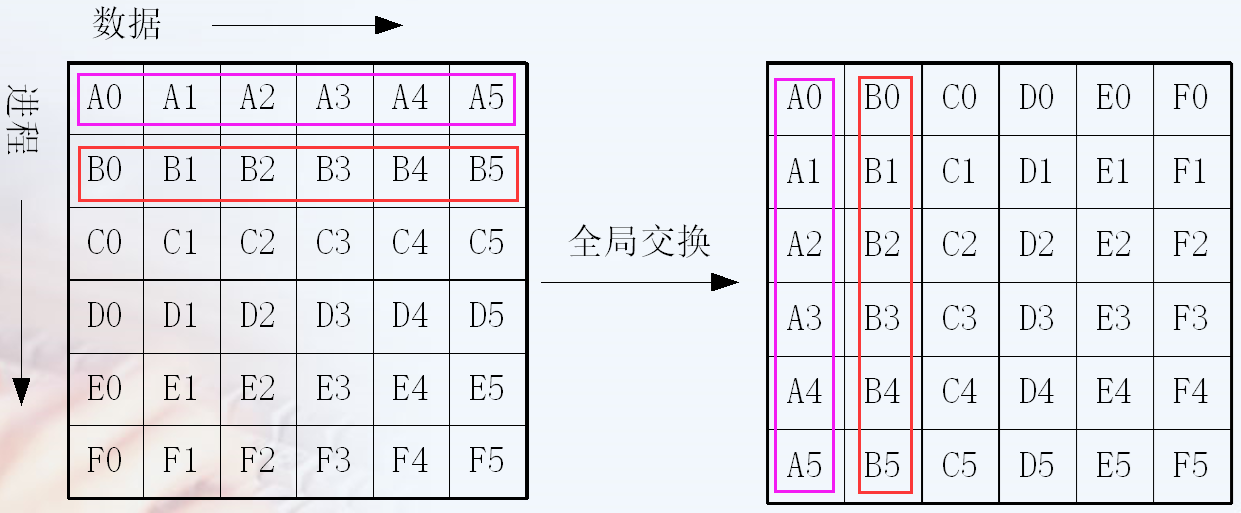
  4. MPI_alltoall()
    1. 等价于每个进程作为Root进程执行了一次MPI_Scatter散播操作。
      1
      2
      3
      4
      5
      6
      int MPI_Allgather(void * sendbuff, int sendcount, MPI_Datatype sendtype, 
      void * recvbuf, int recvcount, MPI_Datatype recvtype,
      MPI_Comm comm)
      int MPI_Allgatherv(void * sendbuff, int sendcount, MPI_Datatype sendtype,
      void * recvbuf, int * recvcounts, int * displs,
      MPI_Datatype recvtype, MPI_Comm comm)
      recvcount gather和allgather是一样的

number of elements received from any process (integer)

注意

  1. 通信域中的所有进程必须调用群集通信函数。如果只有通信域中的一部分成员调用了群集通信函数而其它没有调用,则是错误的。
  2. 除MPI_Barrier以外,每个群集通信函数使用类似于点对点通信中的标准、阻塞的通信模式。也就是说,一个进程一旦结束了它所参与的群集操作就从群集函数中返回,但是并不保证其它进程执行该群集函数已经完成
  3. 一个群集通信操作是不是同步操作取决于实现。MPI要求用户负责保证他的代码无论实现是否同步都必须是正确的。 ???与后面矛盾了 mpich官网说明的。
  4. 关于同步最后一个要注意的地方是:始终记得每一个你调用的集体通信方法都是同步的。
    1. https://mpitutorial.com/tutorials/mpi-broadcast-and-collective-communication/zh_cn/
  5. 在MPI-3.0之前MPI中的所有集合操作都是阻塞的,这意味着在返回之后使用传递给它们的所有缓冲区是安全的.特别是,这意味着当其中一个函数返回时,会收到所有数据.(但是,它并不意味着所有数据都已发送!)因此,如果所有缓冲区都已有效,则在集合操作之前/之后MPI_Barrier不是必需的(或非常有用).
  6. 对用户的建议:为保证程序正确性而依赖于集合操作中同步的副作用是很危险的作法.例如,即便一个特定的实现策略可以提供一个带有同步副作用的广播通信例程, 但标准却不支持它,因此依赖于此副作用的程序将不可移植.从另一方面讲,一个正确的、可移植的程序必须能容忍集合操作可能带来同步这样 一个事实.尽管一个程序可以丝毫不依赖于这种同步的副作用,编程时也必须这样做.这个问题在4.12节中还将进一步讨论(对用户的建议结尾) https://scc.ustc.edu.cn/zlsc/cxyy/200910/MPICH/mpi41.htm
  7. 关于不同的进程运行同一句Bcast的效果
    1. 当根节点(在我们的例子是节点0)调用 MPI_Bcast 函数的时候,data 变量里的值会被发送到其他的节点上。当其他的节点调用 MPI_Bcast 的时候,data 变量会被赋值成从根节点接受到的数据。
    2. 所以如果有进程无法到达该语句Bcast,同步的性质会导致到达Bcast的命令需要等待。

聚合

MPI聚合的功能分三步实现

  • 首先是通信的功能,即消息根据要求发送到目标进程,目标进程也已经收到了各自需要的消息;
  • 然后是对消息的处理,即执行计算功能;
  • 最后把处理结果放入指定的接收缓冲区。

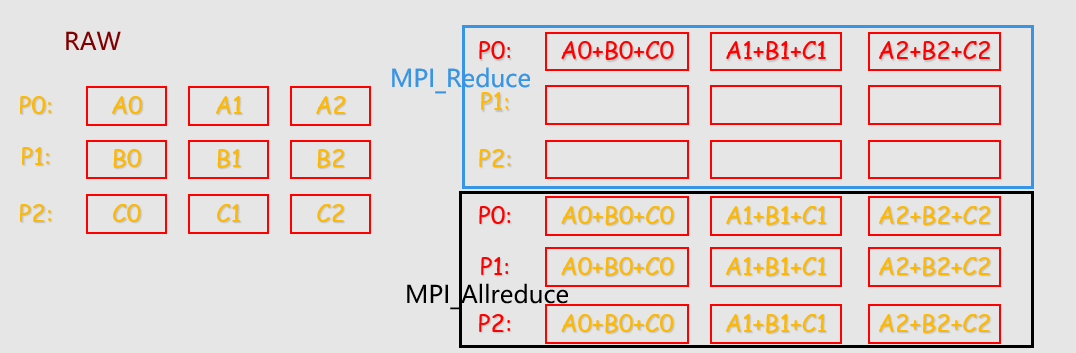
MPI提供了两种类型的聚合操作: 归约和扫描。

聚合——归约

1
2
3
4
5
6
7
8
9
10
11
12
13
14
15
16
17
18
int MPI_Reduce(
void *input_data, /*指向发送消息的内存块的指针 */
void *output_data, /*指向接收(输出)消息的内存块的指针 */
int count,/*数据量*/
MPI_Datatype datatype,/*数据类型*/
MPI_Op operator,/*规约操作*/
int dest,/*要接收(输出)消息的进程的进程号*/
MPI_Comm comm);/*通信器,指定通信范围*/
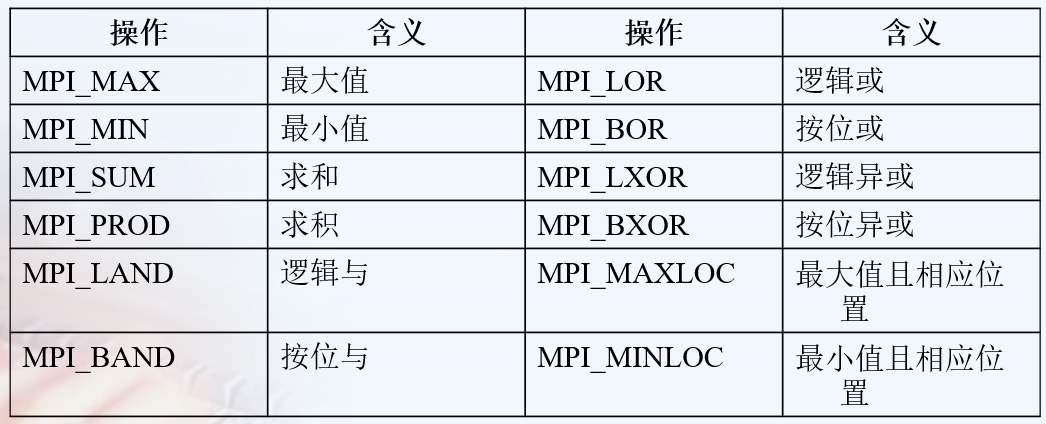
// operator可以有:求最大值 MPI_MAX 最小值 求累加和 累乘积 逻辑操作

// 求和语句
MPI_Reduce(&local_int,&total_int,1,MPI_DOUBLE,MPI_SUM,0,MPI_COMM_WORLD);

//另外有时候需要将得到的结果放入所有的线程中
MPI_Allreduce(void* input_data_p,void*output_data_p, int count,MPI_Datatype datatype,MPI_Op operator, MPI_Comm comm);

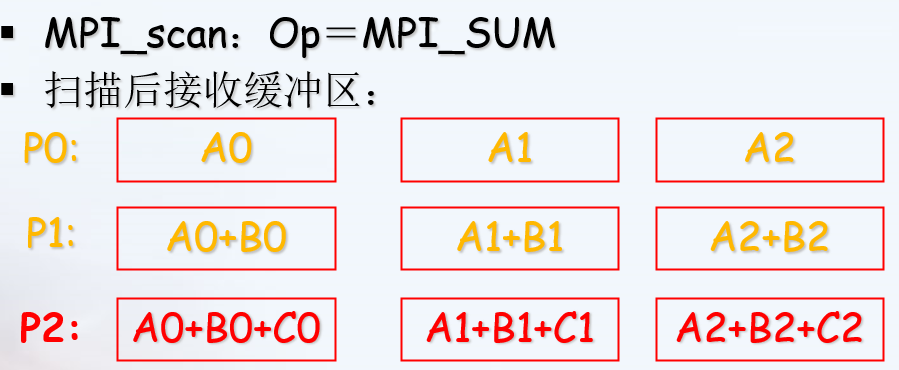
//每一个进程都对排在它前面的进程进行归约操作。
MPI_scan(SendAddress, RecvAddress, Count, Datatype, Op, Comm)


自定义归约操作

1
2
3
4
5
6
7
8
int MPI_Op_create(MPI_User_function *function, int commute, MPI_Op *op)

//function 用户自定义的函数(函数)
//commute 如果commute=ture, 则此操作同时也是可交换的。如果commute=false,则此操作不满足交换律。
else 按进程号升序进行Op操作
//op 自定义归约操作名

int MPI_Op_free(MPI_Op *op) //将用户自定义的归约操作撤销, 将op设置成MPI_OP_NULL。

用户自定义函数 function
typedef void MPI_User_function(void *invec, void *inoutvec, int *len, MPI_Datatype *datatype)

1
2
3
4
for(i=0;i<*len;i++)  {
*inoutvec = *invec USER_OP *inoutvec;
inoutvec++; invec++;
}

必须具备四个参数:

  1. invec 和 inoutvec 分别指出将要被归约的数据所在的缓冲区的首地址,
  2. len指出将要归约的元素的个数, datatype 指出归约对象的数据类型

也可以认为invec和inoutvec 是函数中长度为len的数组, 归约的结果重写了inoutvec 的值。

梯形积分(MPI_Reduce)

1
2
3
4
5
6
7
8
 /*
@local_inte:send buffer;
@total_inte:receive buffer;
@MPI_SUM:MPI_Op;
@dest=0,rank of the process obtaining the result.
*/ 中间改成这个

MPI_Reduce(&local_inte, &total_inte, 1, MPI_DOUBLE, MPI_SUM, 0, MPI_COMM_WORLD);

注意事项

  1. 除了#include “mpi.h”

需要进一步的研究学习

MPI_Group https://www.rookiehpc.com/mpi/docs/mpi_group.php

并行IO文件

1997年推出了MPI的最新版本MPI-2

MPI-2加入了许多新特性,主要包括

  • 动态进程(Dynamic Process)
  • 远程存储访问(Remote Memory Access)
  • 并行I/O访问(Parallel I/O Access)
    • MPI-1没有对并行文件I/O给出任何定义,原因在于并行I/O过于复杂,很难找到一个统一的标准。
      more

遇到的问题

数据发送和收集

开题缘由、总结、反思、吐槽~~

参考文献

https://blog.csdn.net/susan_wang1/article/details/50033823

https://blog.csdn.net/u012417189/article/details/25798705

是否死锁: https://stackoverflow.com/questions/20448283/deadlock-with-mpi

https://mpitutorial.com/tutorials/

http://staff.ustc.edu.cn/~qlzheng/pp11/ 第5讲写得特别详细

https://www.mpich.org/static/docs/latest/www3/

Keyboard

It’s a fucking crazy thing when you reuse a Bluetooth device, because forget how to make pair.

logitech K780

My keyboard encounter Poor contact of keyboard keys, esepeacially the ctrl

change Win/Mac/IOS configurations

iOS fn + i

Mac OS X fn + o

Windows fn + p

LEOPOLO FC980M

Bluetooth pair

Read more: official ref and ref_photo

It seems that just

  1. Open the battery cover
  2. insert AAA battery and Set the power switch to the ON position.

you can Turn on the Bluetooth.

Answer from TAOBAO

连接蓝牙方法:(我们键盘没有送蓝牙适配器)需要您电脑有蓝牙功能,

  1. 第一步背后大开关打到on,
  2. 第二步用取卡针捅一下大开关下面的孔、进入配对环节,
  3. 第三步打开电脑蓝牙搜蓝牙键盘的型号按提示连接就行。参考

Windows weird option 输入 FC980MBT 的PIN,也可以选择关闭,尤其是鼠标也需要输入时:

  1. type 00000 using original keyboard,click confirm.
  2. type 00000 using new keyboard, enter.

需要进一步的研究学习

暂无

遇到的问题

暂无

开题缘由、总结、反思、吐槽~~

参考文献

上面回答部分来自ChatGPT-3.5,没有进行正确性的交叉校验。